Built-in Admin Dashboard
The gateway ships an embedded /admin web dashboard (issue #772). At runtime it is a single HTML payload served from the binary; contributors edit the Vite/React source in admin-ui/, and dcc-mcp-gateway-admin owns the audit/trace/caller domain, compact agent-facing, link, issue-report, statistics, audit-analytics, governance, artifact, activity-timeline, task-outcome, debug-bundle, postmortem, agent-trace packet, memory-summary, experiment, privacy-safe skill-path, and metadata-only traffic projections, plus the optional frontend build and embedded asset. The gateway crate retains only data-source and HTTP adapters for those contracts. Builds that do not enable the gateway admin feature never execute the Node/Vite build boundary.
Activation and Defaults
/admin is enabled by default on the elected gateway. This is intentional: the gateway and admin dashboard are part of the default local observability surface.
dcc-mcp-server / server.exe
# Default: joins gateway election on :9765; elected process serves /admin
dcc-mcp-server --app maya

# Disable gateway entirely (also disables admin)
dcc-mcp-server --gateway-port 0

# Keep gateway but disable admin
dcc-mcp-server --no-admin

# Move admin under another prefix
dcc-mcp-server --admin-path /dcc-adminEquivalent env vars:
| Env var | Default | Description |
|---|---|---|
DCC_MCP_GATEWAY_PORT | 9765 | Gateway election port. 0 disables gateway/admin. |
DCC_MCP_NO_ADMIN | false | Disable the Admin UI on the elected gateway. |
DCC_MCP_ADMIN_PATH | /admin | Admin URL prefix. |
DCC_MCP_GATEWAY_AUDIT_DIR | unset | Optional JSONL directory for durable audit.jsonl and traces.jsonl; unset keeps zero-disk in-memory behavior. |
DCC_MCP_GATEWAY_AUDIT_MAX_ROWS | 5000 | Max JSONL rows retained per durable file when persistence is enabled. |
DCC_MCP_GATEWAY_AUDIT_MAX_BYTES | 52428800 | Approx. 50 MiB byte cap per durable JSONL file; the gateway enforces both row and byte limits. |
DCC_MCP_LOG_DIR | platform log dir | Directory scanned by /admin/api/logs for *.log files; defaults to %USERPROFILE%\\AppData\\Local\\dcc-mcp\\log on Windows and ~/.local/share/dcc-mcp/log elsewhere. |
Python API
from dcc_mcp_core import McpHttpConfig, McpHttpServer, ToolRegistry

cfg = McpHttpConfig(port=0, server_name="maya-mcp")
# Defaults for Python embedders:
# cfg.gateway_port == 9765
# cfg.admin_enabled is True
# cfg.admin_path == "/admin"

# Disable gateway/admin for an isolated local-only server:
cfg.gateway_port = 0

# Or keep gateway but hide admin:
cfg.admin_enabled = False

server = McpHttpServer(ToolRegistry(), cfg)
handle = server.start()Rust gateway API
use dcc_mcp_gateway::gateway::GatewayConfig;

let config = GatewayConfig {
    admin_enabled: true,          // default
    admin_path: "/admin".into(),  // default
    ..GatewayConfig::default()
};When using dcc-mcp-gateway directly, compile with the admin Cargo feature. dcc-mcp-http and the shipped server binary enable this for their embedded gateway path.
Instance and Log Version Diagnostics
The Instances panel keeps the DCC application, adapter, and core server versions separate. It also shows gui, standalone, or unknown for the registered runtime shape; update checks use only the core server version and never fall back to the DCC or adapter version.
The Logs panel shows the gateway server version for regression triage. File-log rows keep tracing ThreadId(...) context separate from the Rust target so the group heading identifies the emitting module instead of the worker thread.
Locale Detection
The embedded Admin UI includes a small in-bundle i18n runtime. It reads navigator.languages / navigator.language, normalizes supported browser tags, and falls back to English when no supported preference is present. No translation assets are fetched over the network.
Supported runtime locales are:
enzh-CNforzh,zh-Hans,zh-CN, and other Simplified Chinese tagsjaforja/ja-JPkoforko/ko-KR
Translation entries live in feature namespaces in admin-ui/src/i18n.ts. Shared chrome and status labels use common, app shell text uses chrome, navigation labels use navigation, and panel-owned copy can live in its own namespace such as setup, health, instances, tools, tasks, openapi, calls, traces, stats, logs, or skillPaths.
Panels should request only their own namespace plus shared namespaces via the typed namespace translator. Dynamic text should use the interpolation helper instead of string concatenation so future translations can reorder grammar. Machine identifiers such as tool slugs, request ids, DCC types, JSON fields, and log payloads should remain unmodified. Tests audit namespace/locale parity so missing keys are caught before release. Future manual language selection should pass an explicit override through the same detection helper instead of bypassing the runtime.
Maintaining Admin UI Translations
When adding a panel or changing visible UI chrome:
- Add or update the feature namespace in
admin-ui/src/i18n.ts. - Provide every key for all supported locales:
en,zh-CN,ja, andko. - Keep shared actions, table labels, status notices, and search metadata in
commonorsearchwhen they are reused across panels. - Use interpolation placeholders such as
{count}or{value}for dynamic grammar instead of assembling translated sentences with string concatenation in React code. - Do not translate machine identifiers or raw technical payloads: tool slugs, request IDs, trace IDs, DCC types, file paths, JSON keys, HTTP methods, status codes, log messages, and backend-provided payload text must remain exact.
Validation for i18n changes:
vx npm run build
vx npx playwright test tests/i18n.spec.ts tests/admin.spec.ts
vx just admin-build
vx git diff --checktests/i18n.spec.ts verifies locale normalization and namespace parity for all supported locales. tests/admin.spec.ts includes mocked admin API flows in both English and non-English browser locales so UI chrome is localized while machine data remains stable.
Dashboard Screenshots
The screenshots below use representative demo data and show the browser-first operator workflows exposed by the embedded dashboard.
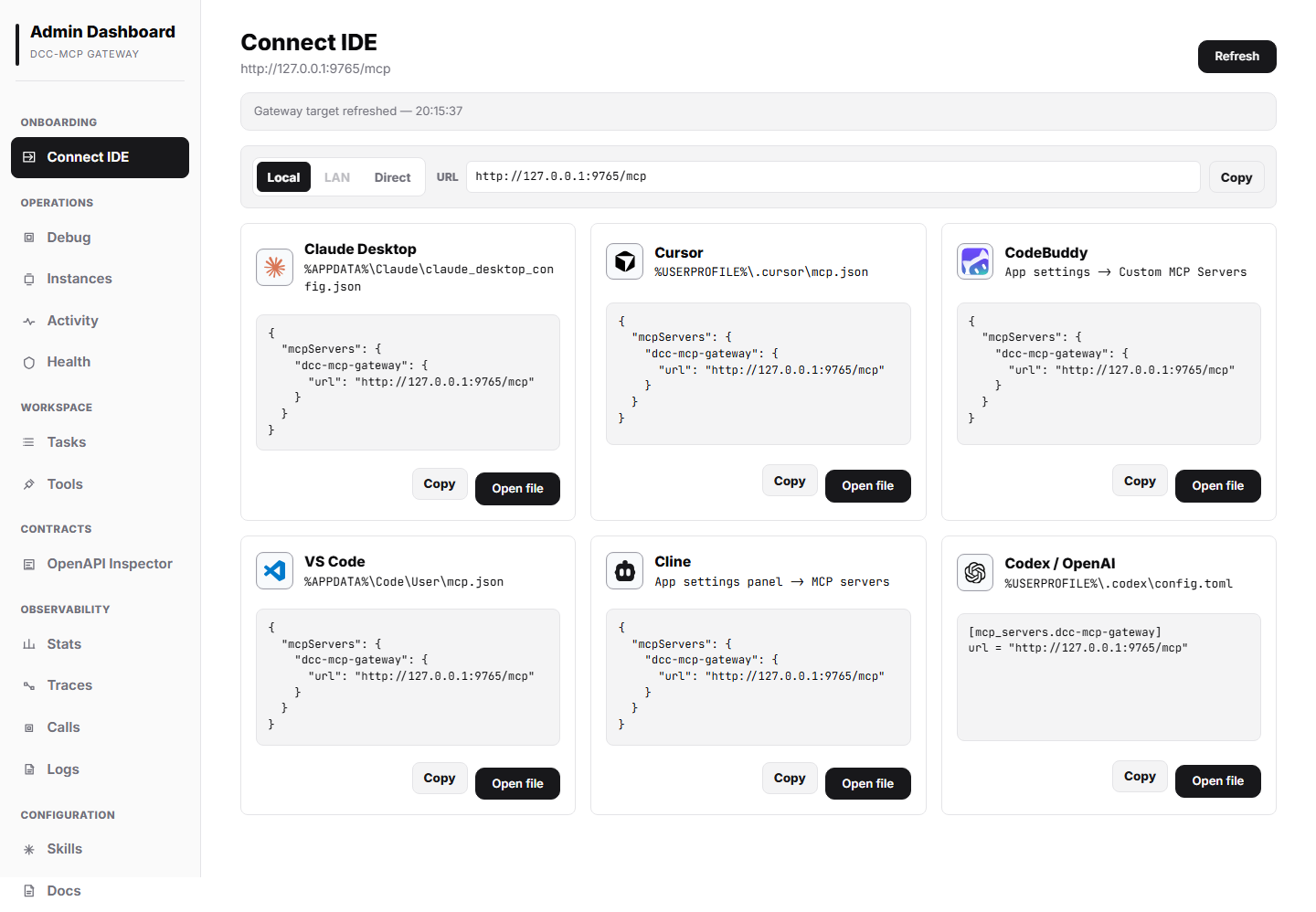
The Command Center panel provides copyable agent prompts, human CLI commands, and MCP configuration snippets for Claude Desktop, Cursor, CodeBuddy, VS Code, Cline, and Codex / OpenAI. Commands use the current gateway URL and highlight that dcc-mcp-cli auto-ensures the local gateway before live DCC operations.
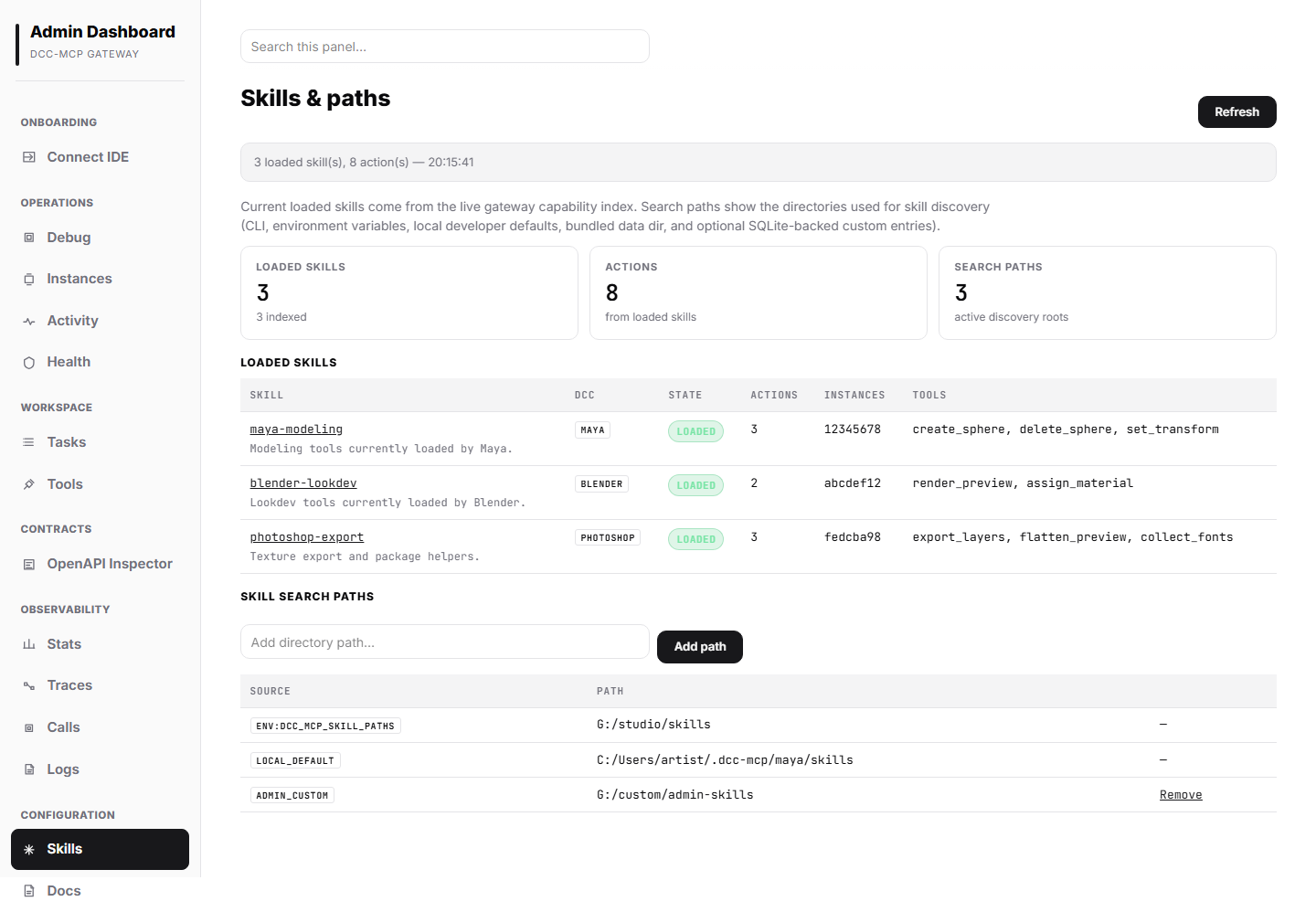
The Skills panel shows loaded skills, action counts, per-instance prefixes, active skill discovery roots, and the local developer default ~/.dcc-mcp/{dcc-type}/skills path when present.
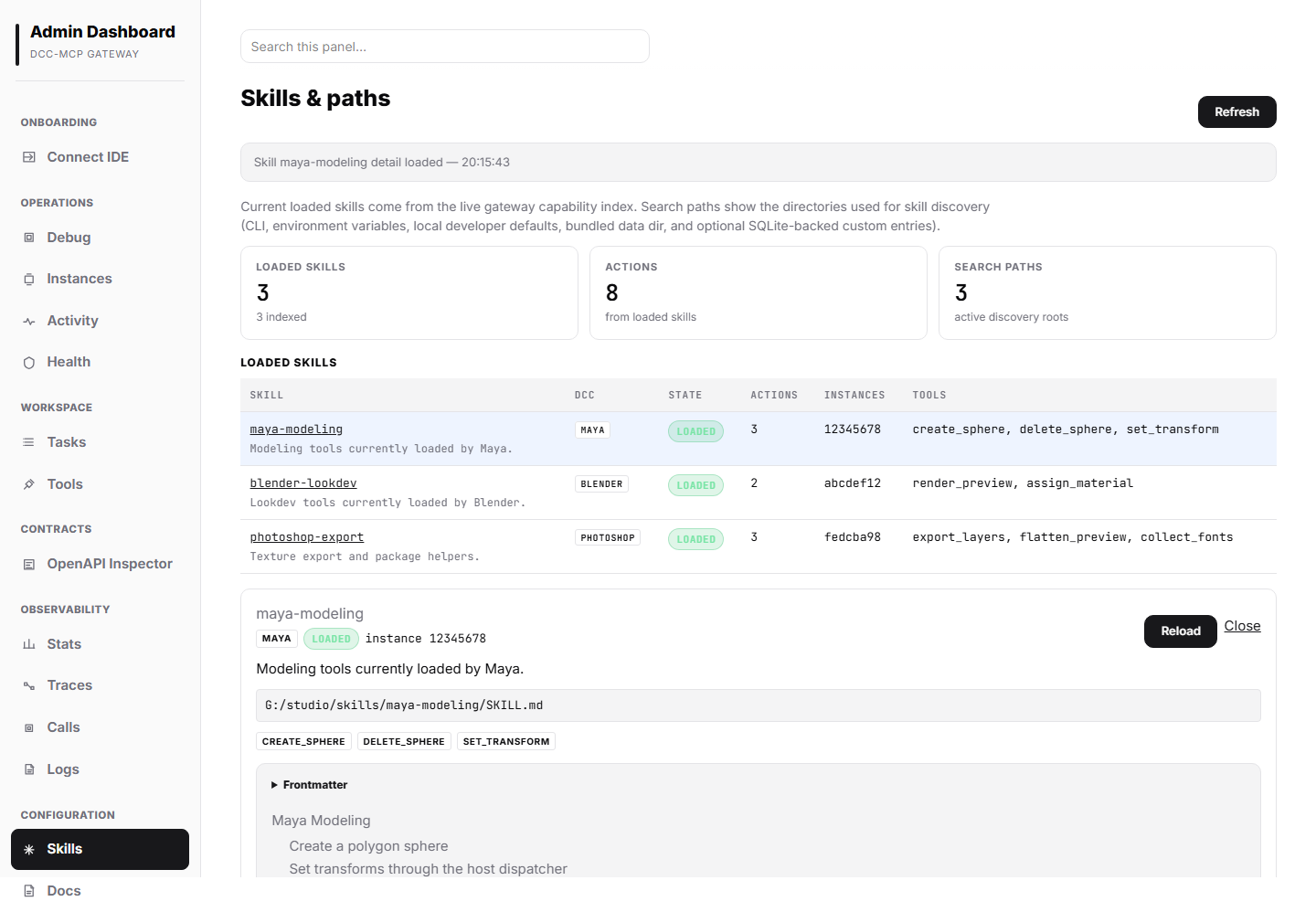
Clicking a skill opens its detail panel, including backend instance metadata, registered tools, SKILL.md source path, parsed frontmatter, and rendered Markdown body for developer review.
Marketplace Panel
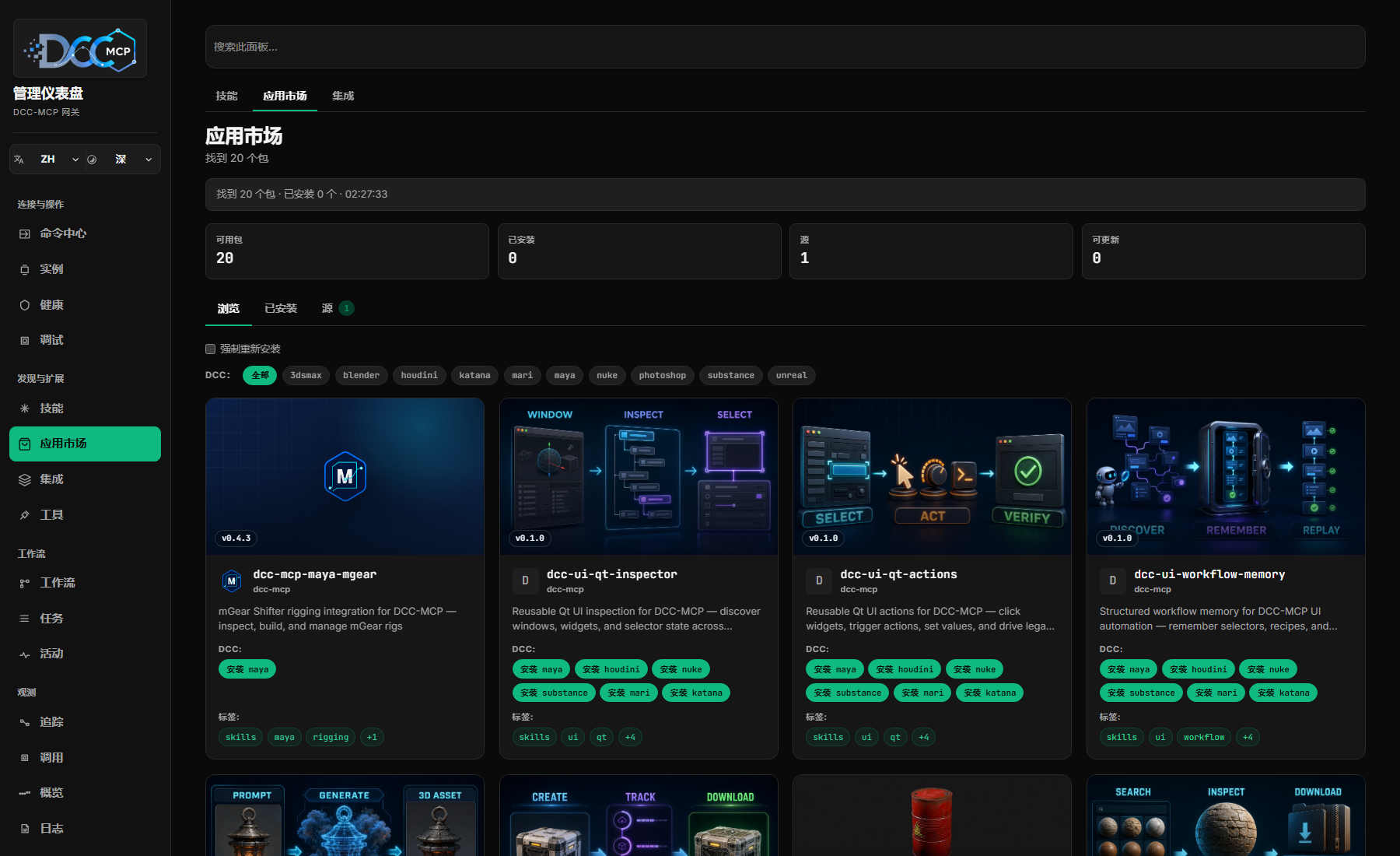
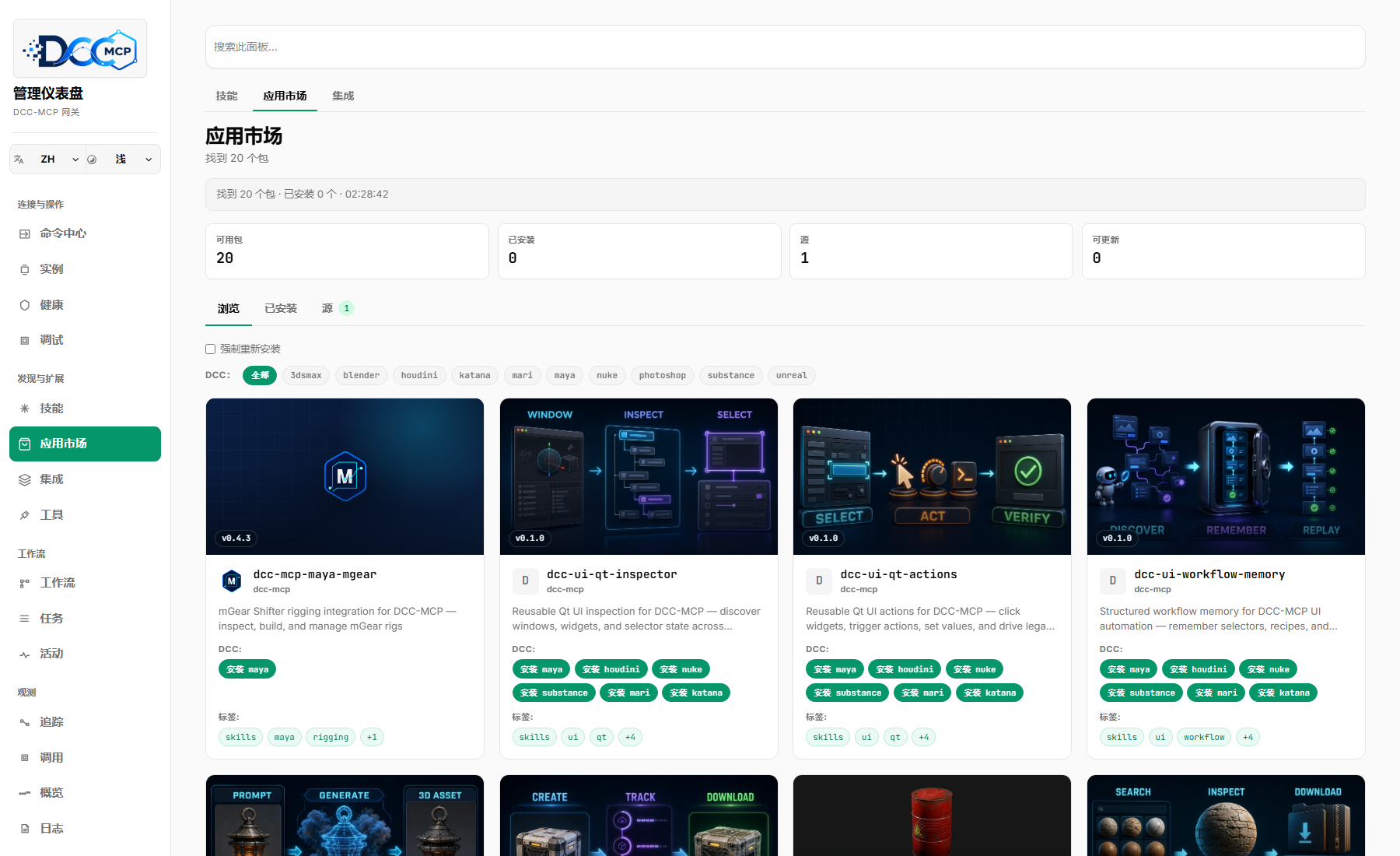
The Marketplace panel, accessible from the left navigation, provides a graphical interface for browsing, installing, and managing skill packages from the DCC-MCP marketplace catalog. It exposes the same capabilities as the CLI marketplace subcommand through three tabs: Browse, Installed, and Sources.
Browse Tab
The Browse tab displays available skill packages in a searchable visual catalog. Cards use the package's pinned 16:9 workflow showcase when available, then keep the package name, description, DCC actions, version, and tags compact below it. The image falls back to the package or DCC icon when no showcase is published. Publishers declare one showcase file in their repository's marketplace.json. Repository-relative PNG, JPEG, WebP, AVIF, and animated GIF paths are resolved against the entry's immutable 40-character Git revision before display.
Users can filter the catalog by:
- Search query: text search across name, description, and tags.
- DCC type filter: a row of Chip buttons at the top of the tab to filter by DCC type. Search and DCC filter can be combined.
Clicking a card opens the Marketplace detail modal showing full metadata: name, description, version, tags, DCC type, maintainer, project URL, source, install type (git, zip, path), and min_core_version. When the package's min_core_version is lower than the currently running core version, a compatibility warning is displayed.
Installing a package from the detail modal or card triggers the marketplace install flow. On success, an inline notice appears with a View in Skills deep link that navigates to the Skills panel and highlights the newly loaded skill. If the backend reports a reload_required flag, the skill index is refreshed automatically.
Installed Tab
The Installed tab is a dense operator inventory, not another card grid. It lists one row per installed {package, dcc} pair and shows:
- Package name, DCC type, and local install path.
- Installed version and an update-available badge when the catalog reports a newer version.
- Source name / URL and install type (
git,zip, orpath). - Installed timestamp when available.
- Direct Detail, Update, and Uninstall actions.
The Detail action opens a right-aligned slide-out detail panel with the same portal-based animation and backdrop blur as the Skills detail panel. The panel displays the package path, install type, source metadata, timestamp, version, tags, and catalog metadata when available, with the same update and uninstall actions as the row.
Users can uninstall a package directly from this tab or from the slide-out. On success, the skill index is refreshed to reflect the removed package.
Source Management Tab
A Sources management interface is accessible from the Marketplace panel, letting operators view and add marketplace sources without the CLI:
- Source list: displays each configured source with its origin label (
builtin,config,env) and the raw URL. - Add source: an inline form to enter a new marketplace source URL. Duplicate additions are idempotent — adding an already-registered source is a no-op rather than a hard error.
- Read-only origins: built-in, environment, and existing config sources are displayed as provenance evidence. The current Admin API exposes
GETandPOSTfor sources; source removal is intentionally not part of this UI contract yet.
Source changes take effect immediately for subsequent catalog queries, and the Browse tab refreshes on the next interaction.
Update Flow
When newer versions are available for installed packages, the Installed tab shows an Update button on each outdated row. The button triggers a marketplace update for that single {package, dcc} pair. The backend API also accepts { all: true } for automation that wants to update every outdated package in one operation; the browser UI keeps this as explicit per-row operator action.
The update flow uses the force install flag internally, allowing the new version to overwrite the existing installation. After update completes, the backend triggers a skill index reload if needed (reload_required: true). For git-type installs, the update fetches the new ref in place rather than re-cloning; other install types re-install from the catalog.
Force Install
The Browse tab includes a Force reinstall checkbox. When enabled, install requests send force: true, allowing a package to overwrite an existing local installation. Update requests use the same overwrite semantics internally so a new catalog version can replace the current checkout or extracted package.
Structured Error Display
Install, update, and uninstall operations return structured error responses and the UI maps them to operator-readable messages instead of dumping raw JSON. Currently recognized marketplace error kinds include already_installed, not_found, hash_mismatch, missing_skill, and command_failed; network failures are reported separately. If an Admin API route accidentally returns an HTML shell (for example a dev server or reverse proxy routed /admin/api/marketplace/install back to the Vite page), the UI reports Admin API returned HTML for ... so operators know the gateway/admin routing is wrong instead of seeing Unexpected token '<'.
API Endpoints
| Route | Content-Type | Description |
|---|---|---|
GET /admin/api/marketplace/catalog | application/json | List available packages from all configured sources. Returns { entries: MarketplaceEntry[] }. |
GET /admin/api/marketplace/installed | application/json | List locally installed packages with per-DCC grouping. Returns { packages: InstalledMarketplacePackage[] }. |
POST /admin/api/marketplace/install | application/json | Install a package. Body: { name, dcc, source?, force? }. Returns InstallResultResponse with reload_required flag. |
POST /admin/api/marketplace/uninstall | application/json | Uninstall a package. Body: { name, dcc }. Returns UninstallResultResponse with reload_required flag. |
GET /admin/api/marketplace/sources | application/json | List configured marketplace sources with origin (builtin, config, env). |
POST /admin/api/marketplace/sources | application/json | Add a marketplace source to the persistent config. Body: { source }. Duplicate additions are idempotent. |
GET /admin/api/marketplace/outdated | application/json | List installed packages that have newer versions available. Supports ?name=&dcc= filters. |
POST /admin/api/marketplace/update | application/json | Update one or all outdated packages. Body: { name?, dcc?, all? }. Returns per-result reload_required flags. |
Routes
| Route | Content-Type | Description |
|---|---|---|
GET /admin | text/html | Embedded React/Vite dashboard served as one HTML asset |
GET /admin/api/activity?limit=300 | application/json | Unified activity timeline built from audits, traces, and gateway events |
GET /admin/api/instances | application/json | Connected DCC instances |
POST /admin/api/instances/{instance_id}/update | application/json | Check and stage a dcc-mcp-server update for one instance; the instance card shows the result and any restart-required state |
GET /admin/api/tools | application/json | Registered MCP tools |
GET /admin/api/workflows?limit=200 | application/json | Agent session/workflow view reconstructed from search telemetry, traces, and audits |
GET /admin/api/tasks?limit=300 | application/json | User-level task outcomes grouped across workflows, calls, artifacts, and validation |
GET /admin/api/calls | application/json | Recent tool calls, including compact/JSON token accounting when available (requires AuditMiddleware) |
GET /admin/api/traces | application/json | Recent per-call dispatch traces with payload sizes and token accounting; accepts ?limit=200 |
GET /admin/api/traces/{request_id} | application/json | Full waterfall for one recorded dispatch trace, including token accounting without storing unbounded payloads |
GET /admin/api/traffic?limit=300 | application/json | capture_status plus retained metadata-only traffic.frame envelopes from an explicit admin_live traffic sink |
GET /admin/api/traffic/export?limit=1000 | application/x-ndjson | Retained metadata-only traffic frames as JSONL for safe local inspection/diff workflows |
GET /admin/api/debug-bundle/{request_id} | application/json | One-stop debug bundle containing the trace, matching audit row, related activity, and hints |
GET /admin/api/stats?range=1h|24h|7d | application/json | Aggregated call counts, success rate, latency, top tools/instances/agents, and token-savings totals |
GET /admin/api/analytics/overview?range=7d|30d|90d|180d|365d | application/json | Analytics KPI summary, top tools, token totals, and period bounds |
GET /admin/api/analytics/timeseries?range=...\&granularity=day | application/json | Daily call, token, average duration, and max_duration_ms series used by the trend chart and Token Activity calendar |
GET /admin/api/analytics/heatmap?range=... | application/json | Hour/weekday heatmap compatibility endpoint for clients that still consume the older aggregate shape |
GET /admin/api/analytics/export?range=... | text/csv or application/x-ndjson | Download analytics data for local review |
GET /admin/api/governance?limit=300 | application/json | Effective gateway policy, traffic capture, redaction, middleware controls, and recent allow/deny/throttle decisions |
GET /admin/api/workers | application/json | Per-instance cards from the live registry; response field names remain workers for compatibility |
GET /admin/api/logs | application/json | Merged gateway operational events, on-disk *.log rows, and audited call summaries |
GET /admin/api/health | application/json | Service health summary, including active response-format defaults and token estimator metadata |
GET /admin/api/skills | application/json | Live skill inventory grouped by DCC type, skill name, load state, tools, backend instance, and skill health/adoption metrics from search telemetry plus audited calls |
GET /admin/api/skill-detail?name=... | application/json | One skill's backend detail payload, including rendered-review SKILL.md markdown when available |
GET /admin/api/skill-paths | application/json | Current skill discovery roots with safe path aliases, present/missing status, and source/id metadata for public-safe screenshots and exports |
POST /admin/api/skill-paths | application/json | Add a SQLite-backed custom skill discovery root, then refresh live backend skill indexes |
DELETE /admin/api/skill-paths/{id} | application/json | Remove a SQLite-backed custom skill discovery root, then refresh live backend skill indexes |
GET /admin/api/integrations | application/json | Integration configuration summary: Sentry DSN status, webhook count, WeCom message push, OTLP endpoint, and pending-restart flags |
PUT /admin/api/integrations | application/json | Save one file-backed integration under ~/dcc-mcp/etc or DCC_MCP_ETC_DIR, returning a masked pending-restart entry |
Stable agent-facing mirrors are exposed under /v1/debug/* and are included in GET /v1/openapi.json. The Admin routes above remain the dashboard compatibility layer; automation should prefer:
| Stable route | Mirrors |
|---|---|
GET /v1/debug/instances | /admin/api/instances |
GET /v1/debug/activity?limit=300 | /admin/api/activity |
GET /v1/debug/traces?limit=200 | /admin/api/traces |
GET /v1/debug/traces/{request_id} | /admin/api/traces/{request_id} |
GET /v1/debug/traffic?limit=300 | /admin/api/traffic |
GET /v1/debug/traffic/export?limit=1000 | /admin/api/traffic/export |
GET /v1/debug/trace-context/{lookup_id} | trace id or request id lookup |
GET /v1/debug/agent-traces/{lookup_id} | public-safe agent trace packet by trace id or request id |
GET /v1/debug/bundles/{request_id_or_trace_id} | /admin/api/debug-bundle/{request_id} |
GET /v1/debug/issue-reports/{request_id} | /admin/api/issue-report/{request_id}; public-safe by default, ?mode=raw for reviewed local evidence |
GET /v1/debug/workflows | /admin/api/workflows |
GET /v1/debug/tasks | /admin/api/tasks |
GET /v1/debug/calls | /admin/api/calls |
GET /v1/debug/logs | /admin/api/logs |
GET /v1/debug/stats | /admin/api/stats |
GET /v1/debug/analytics/overview | /admin/api/analytics/overview |
GET /v1/debug/analytics/timeseries | /admin/api/analytics/timeseries |
GET /v1/debug/analytics/heatmap | /admin/api/analytics/heatmap |
GET /v1/debug/analytics/export | /admin/api/analytics/export |
GET /v1/debug/governance?limit=300 | /admin/api/governance |
GET /v1/debug/integrations | /admin/api/integrations |
GET /v1/debug/health | /admin/api/health |
The Analytics panel renders the 365d Token Activity calendar by default. It uses overview.kpi.tokens_total for cumulative tokens, timeseries[*].tokens_input + tokens_output for day intensity, and timeseries[*].max_duration_ms for the "Longest Task" KPI. The older weekday/hour heatmap endpoint is kept for compatibility, but the dashboard no longer needs it for the contribution-calendar view.
Browser deep links such as /admin?panel=traces&trace=<request_id> are UI navigation only. Historical /admin?agent=traces&trace=<id> links should be treated the same way; automation and agents should resolve the machine-readable packet through GET /v1/debug/agent-traces/{lookup_id}.
Compact-aware debug routes keep JSON as the default for browser downloads and GitHub issue attachments. Agents can request TOON on /v1/debug/traces, /v1/debug/traces/{request_id}, /v1/debug/trace-context/{lookup_id}, /v1/debug/bundles/{request_id_or_trace_id}, and /v1/debug/stats with Accept: application/toon, ?response_format=toon, or ?compact=true. Responses include x-dcc-mcp-response-format, byte counts, estimated token counts, and savings headers. Debug bundle compact output is a summary with root cause, tool, DCC type, status, timing, token accounting, redaction summary, and links to the full JSON bundle.
Optional Agent / Caller Context
MCP and REST callers may attach optional context so the Admin UI can correlate why a request was made with the request waterfall. This is a telemetry contract: callers should send concise summaries, plans, observations, tags, and correlation ids. The gateway does not attempt to capture hidden model chain-of-thought, raw user input, or raw agent replies on the default path.
Supported carriers:
- MCP
initializeparams.clientInfo; the gateway keeps bounded client identity perMcp-Session-Idand fills missing agent/client fields on later MCPtools/callrows. - MCP
tools/callparams._meta.agent_context - REST body
agent_context,agentContext,caller_context, ormeta.agent_context - Headers such as
x-dcc-mcp-actor-id,x-dcc-mcp-actor-name,x-dcc-mcp-actor-email-hash,x-dcc-mcp-agent-id,x-dcc-mcp-agent-name,x-dcc-mcp-agent,x-dcc-mcp-agent-kind,x-dcc-mcp-agent-version,x-dcc-mcp-agent-model,x-dcc-mcp-agent-model-provider,x-dcc-mcp-agent-model-version,x-dcc-mcp-agent-reasoning-effort,x-dcc-mcp-client-platform,x-dcc-mcp-client-os,x-dcc-mcp-client-host,x-dcc-mcp-auth-subject,x-dcc-mcp-agent-session-id,x-dcc-mcp-agent-turn-id,x-dcc-mcp-agent-user-intent-summary,x-dcc-mcp-agent-reply-summary,x-dcc-mcp-agent-user-input-hash,x-dcc-mcp-agent-reply-hash,x-dcc-mcp-agent-user-input-chars,x-dcc-mcp-agent-reply-chars,x-dcc-mcp-agent-task,x-dcc-mcp-reasoning-summary,x-dcc-mcp-parent-request-id, andx-dcc-mcp-agent-context(JSON object) - REST
User-Agent; when no explicitclient_platformis provided, the first product token is stored as a bounded client-platform fallback.
Caller attribution separates five concepts:
| Concept | Fields | Notes |
|---|---|---|
| Human or service actor | actor_id, actor_name, actor_email_hash | Optional, bounded identifiers. Hash email addresses before sending them. |
| Agent runtime | agent_id, agent_name, agent_kind, agent_version, model, model_provider, model_version | model also accepts agentModel; model_version also accepts agentModelVersion. |
| Client platform | client_platform, client_os, client_host | Examples: cursor, claude-desktop, openclaw, clawhub, custom-http, studio-tool. |
| Auth subject | auth_subject | API-key, bearer-token, OAuth, or local identity subject after authentication. |
| Network source | source_ip, forwarded_for | Server-derived only. MCP _meta, REST request bodies, and caller headers cannot set these fields. |
Stored agent_context values include a server-computed trust map, and Admin call/trace rows expose the same data as attribution_trust. Trust values are:
| Trust value | Meaning |
|---|---|
self_reported | Supplied by REST body or MCP _meta; useful for filtering, not identity proof. |
header | Supplied by x-dcc-mcp-* attribution headers; still self-asserted unless a trusted proxy/auth layer owns those headers. |
auth | Derived from gateway authentication or an identity-provider integration. |
server_derived | Derived by the gateway from the socket peer after stripping caller-supplied network fields. |
trusted_proxy | Derived from Forwarded / X-Forwarded-For after the configured trusted-proxy depth has been applied. |
Cursor-like MCP clients can place attribution in _meta.agent_context, custom REST clients can use meta.agent_context, and LAN studio tools that cannot shape JSON bodies can use the x-dcc-mcp-* headers above. Do not send hidden reasoning, full prompts, raw user messages, secrets, bearer tokens, or raw agent replies in any caller-attribution field. LAN operators must not treat self_reported or header actor fields as access control; use gateway auth or a trusted proxy/identity provider before relying on actor metadata for permissions. Raw actor email is not a supported field; send actor_email_hash only after hashing or otherwise pseudonymizing it.
Example REST request:
{
  "tool_slug": "maya.abcdef01.scene__inspect",
  "arguments": { "include_materials": true },
  "meta": {
    "agent_context": {
      "actor_id": "artist-42",
      "actor_name": "Morgan Artist",
      "actor_email_hash": "sha256:...",
      "agent_id": "agent-42",
      "agent_name": "Layout Inspector",
      "agent_kind": "coding-agent",
      "agent_version": "0.9.0",
      "client_platform": "custom-http",
      "client_os": "windows",
      "client_host": "workstation-42",
      "auth_subject": "apikey:team-layout",
      "model_provider": "openai",
      "model_version": "gpt-5.1",
      "model": "gpt-5.4",
      "reasoning_effort": "medium",
      "session_id": "session-42",
      "turn_id": "turn-7",
      "task": "Find the cheapest scene inspection path before editing",
      "user_intent_summary": "User asked for a non-destructive scene inspection before editing.",
      "agent_reply_summary": "The agent will inspect topology and material counts first.",
      "user_input_hash": "sha256:...",
      "agent_reply_hash": "sha256:...",
      "user_input_chars": 128,
      "agent_reply_chars": 192,
      "reasoning_summary": "Need scene topology and material counts before selecting an edit tool.",
      "plan": ["inspect scene", "choose edit target"],
      "observations": ["user asked for non-destructive update"],
      "parent_request_id": "req-parent"
    }
  }
}Admin list rows expose transport, agent_id, agent_name, agent_model, trace_id, span_id, parent_span_id, span counts, payload byte counts, slowest span summaries, and a links object with absolute URLs for the Admin trace page, trace API, debug bundle, issue report JSON, OpenAPI Inspector, OpenAPI spec, OpenAPI docs, and stats page. Full trace rows include agent_context, request/response payload previews, a span waterfall, and the same copyable links. These URLs are designed to be pasted directly into an LLM evaluation prompt or another agent's debugging task. The Tasks panel and GET /admin/api/tasks group retained trace/audit data into user-level outcomes before rendering cards. A task row keeps the historical task_id, task_type, status, title, started_at, duration_ms, and correlation fields, then adds outcome-oriented fields such as goal, summary, final_result, failure_reason, app_types, related, artifacts, validation_checks, and navigation links. Grouping prefers an explicit agent_context.metadata.task_id/workflow_id, then agent session/turn, session id, trace id, and finally request id. Public task rows must not expose raw local paths or loopback/private callback URLs; failure reasons and artifact labels stay summarized or redacted.
The Workflows panel and GET /admin/api/workflows group the same bounded data by session, explicit workflow id, trace id, or request chain. Each workflow row stays lightweight: model identity, turn id, user/agent summaries, discovery quality, and a compact stage preview. Selecting a workflow opens a staged detail graph with Intent, Discovery, Skill Load, Tool Calls, Fallbacks, Artifacts, Validation, and Report nodes. Node details expose timestamps, DCC app/instance, transport, request/parent ids, search telemetry, and trace/debug links so an operator can identify fallback scripting or the failed stage without reading raw call logs. Raw prompts and raw replies are high-sensitivity data: keep them out of agent_context; use only an explicitly configured traffic capture policy with redaction, sampling, retention, and operator visibility when raw text is needed for a private investigation. Traffic capture also treats actor/user/platform metadata as potentially sensitive: built-in redaction masks common attribution identity fields, and capture configs can add explicit redact: rules for deployment-specific metadata paths.
request_id and trace_id are intentionally different. request_id identifies one HTTP/MCP request (or JSON-RPC id), while trace_id identifies the end-to-end unit of work. REST callers may send both X-Request-Id and W3C traceparent; the gateway keeps X-Request-Id as the request id and parses the trace id, parent span id, and flags from traceparent.
The Admin UI also exposes a standalone GET /admin/api/issue-report/{request_id} export. It returns a public-safe GitHub issue report by default with summary, status, DCC type, tool family, timing, sanitized error kind, token accounting, redaction status, and relative same-session links. Default exports intentionally exclude raw payload previews, prompts, scripts, auth material, local callback URLs, absolute filesystem paths, and private scene/project identifiers. Use GET /admin/api/issue-report/{request_id}?mode=raw only for reviewed local evidence; raw mode embeds the correlated debug bundle and should not be pasted into a public issue without inspection.
The front-end product name is Admin Dashboard. The lower REST/OpenAPI contract view is named OpenAPI Inspector. It reads the live gateway /v1/openapi.json contract by default, can load a per-instance OpenAPI contract from ?panel=openapi&spec=...&docs=...&label=..., and links to the matching Scalar reference.
Admin token fields intentionally separate two accounting models:
payload_token_usage, traceinput_tokens/output_tokens, andpayload_token_accountingare deterministic payload-preview estimates from captured request/response bodies. Missing payload estimates are reported asmissing_payload_tokens, not silently treated as true zero-token payloads.token_usage,response_token_accounting, and per-calloriginal_tokens/returned_tokens/saved_tokensdescribe response-format accounting: how many response tokens were returned after JSON/TOON compaction, and how many were saved.
API Response Shapes
// GET /admin/api/health
{
  "status": "ok",
  "uptime_secs": 3600,
  "instances_total": 3,
  "instances_ready": 2,
  "instances_rejected": 1,
  "response_format": {
    "default": "toon",
    "legacy_mime": "application/json",
    "compact_mime": "application/toon",
    "token_estimator": "dcc-mcp-byte4-v1"
  }
}

// GET /admin/api/instances
{
  "total": 3,
  "instances": [
    { "id": "a1b2c3d4-...", "dcc_type": "maya", "status": "ready", "address": "127.0.0.1:9001" }
  ]
}

// GET /admin/api/activity?limit=300
{
  "total": 2,
  "events": [
    {
      "event_id": "audit:req-123",
      "timestamp": "2026-05-05T10:00:00Z",
      "kind": "tool_call",
      "severity": "info",
      "status": "ok",
      "message": "tools/call maya__open_scene",
      "tool": "maya__open_scene",
      "duration_ms": 48,
      "correlation": {
        "request_id": "req-123",
        "session_id": "session-1",
        "instance_id": "abcdef01-2345-6789-abcd-ef0123456789",
        "dcc_type": "maya"
      }
    }
  ]
}

// GET /admin/api/tasks?limit=300
{
  "total": 1,
  "tasks": [
    {
      "task_id": "session-1:turn-7",
      "task_type": "agent_turn",
      "status": "completed",
      "title": "Export and validate shot asset",
      "goal": "Create scene, export asset, import into another DCC, validate result.",
      "final_result": "Produced preview render and validation report.",
      "started_at": "2026-05-05T10:00:00Z",
      "finished_at": "2026-05-05T10:00:08Z",
      "duration_ms": 8000,
      "app_types": ["maya", "blender"],
      "artifacts": [
        { "kind": "export", "name": "export asset", "request_id": "req-export" },
        { "kind": "render", "name": "render preview", "request_id": "req-render" }
      ],
      "validation_checks": [
        { "title": "validate imported asset", "status": "completed", "request_id": "req-validate" }
      ],
      "related": {
        "workflow_ids": ["session-1"],
        "request_ids": ["req-create", "req-export", "req-import", "req-render", "req-validate"],
        "trace_ids": ["trace-123"],
        "session_ids": ["session-1"]
      },
      "correlation": {
        "request_id": "req-validate",
        "workflow_id": "session-1",
        "instance_id": "abcdef01-2345-6789-abcd-ef0123456789",
        "dcc_type": "maya"
      }
    }
  ]
}

// GET /admin/api/workflows?limit=200
{
  "total": 1,
  "workflows": [
    {
      "workflow_id": "session-1",
      "group_kind": "session",
      "title": "Layout Inspector: maya.abcdef01.scene__inspect",
      "status": "completed",
      "discovery": {
        "search_count": 1,
        "zero_result_count": 0,
        "selected_count": 3,
        "best_selected_rank": 2,
        "time_to_first_success_ms": 310,
        "search_ids": ["search-123"]
      },
      "steps": [
        { "kind": "search", "title": "search scene inspect", "status": "ok" },
        { "kind": "describe", "title": "maya.abcdef01.scene__inspect", "status": "ok" },
        { "kind": "load_skill", "title": "load_skill scene", "status": "ok" },
        { "kind": "call", "request_id": "req-123", "title": "maya.abcdef01.scene__inspect", "status": "ok" }
      ]
    }
  ]
}

// GET /admin/api/calls  (requires AuditMiddleware)
{
  "total": 42,
  "calls": [
    {
      "request_id": "req-123",
      "method": "tools/call",
      "tool": "maya.abcdef01.maya__open_scene",
      "dcc_type": "maya",
      "instance_id": "abcdef01-2345-6789-abcd-ef0123456789",
      "session_id": "session-1",
      "transport": "mcp",
      "agent_id": "agent-42",
      "agent_name": "Layout Inspector",
      "agent_model": "gpt-5.4",
      "links": {
        "admin_trace_url": "http://127.0.0.1:9765/admin?panel=traces&trace=req-123",
        "trace_api_url": "http://127.0.0.1:9765/admin/api/traces/req-123",
        "agent_trace_packet_url": "http://127.0.0.1:9765/v1/debug/agent-traces/req-123",
        "debug_bundle_url": "http://127.0.0.1:9765/admin/api/debug-bundle/req-123",
        "issue_report_url": "http://127.0.0.1:9765/admin/api/issue-report/req-123",
        "openapi_inspector_url": "http://127.0.0.1:9765/admin?panel=openapi",
        "openapi_spec_url": "http://127.0.0.1:9765/v1/openapi.json",
        "openapi_docs_url": "http://127.0.0.1:9765/docs",
        "stats_url": "http://127.0.0.1:9765/admin?panel=overview&overviewTab=stats"
      },
      "token_accounting": {
        "response_format": "toon",
        "token_estimator": "dcc-mcp-byte4-v1",
        "original_tokens": 120,
        "returned_tokens": 54,
        "saved_tokens": 66,
        "savings_pct": 55.0
      },
      "success": false,
      "error": "backend timeout",
      "timestamp": "2026-05-05T10:00:00Z"
    }
  ]
}

// GET /admin/api/traces?limit=200
{
  "total": 1,
  "traces": [
    {
      "request_id": "req-123",
      "tool": "maya.abcdef01.maya__open_scene",
      "dcc_type": "maya",
      "transport": "mcp",
      "agent_id": "agent-42",
      "span_count": 3,
      "slowest_span_name": "backend.execute",
      "slowest_span_ms": 45,
      "input_bytes": 42,
      "output_bytes": 96,
      "token_accounting": {
        "response_format": "json",
        "token_estimator": "dcc-mcp-byte4-v1",
        "original_tokens": 24,
        "returned_tokens": 24,
        "saved_tokens": 0,
        "savings_pct": 0.0
      },
      "links": {
        "admin_trace_url": "http://127.0.0.1:9765/admin?panel=traces&trace=req-123",
        "trace_api_url": "http://127.0.0.1:9765/admin/api/traces/req-123",
        "agent_trace_packet_url": "http://127.0.0.1:9765/v1/debug/agent-traces/req-123",
        "debug_bundle_url": "http://127.0.0.1:9765/admin/api/debug-bundle/req-123",
        "issue_report_url": "http://127.0.0.1:9765/admin/api/issue-report/req-123",
        "openapi_inspector_url": "http://127.0.0.1:9765/admin?panel=openapi",
        "openapi_spec_url": "http://127.0.0.1:9765/v1/openapi.json",
        "openapi_docs_url": "http://127.0.0.1:9765/docs",
        "stats_url": "http://127.0.0.1:9765/admin?panel=overview&overviewTab=stats"
      },
      "total_ms": 48,
      "success": true,
      "status": "ok"
    }
  ]
}

// GET /admin/api/traces/req-123
{
  "request_id": "req-123",
  "method": "tools/call",
  "tool_slug": "maya.abcdef01.maya__open_scene",
  "dcc_type": "maya",
  "transport": "mcp",
  "agent_context": {
    "agent_id": "agent-42",
    "agent_name": "Layout Inspector",
    "model": "gpt-5.4",
    "reasoning_summary": "Need scene topology before editing."
  },
  "links": {
    "admin_trace_url": "http://127.0.0.1:9765/admin?panel=traces&trace=req-123",
    "trace_api_url": "http://127.0.0.1:9765/admin/api/traces/req-123",
    "agent_trace_packet_url": "http://127.0.0.1:9765/v1/debug/agent-traces/req-123",
    "debug_bundle_url": "http://127.0.0.1:9765/admin/api/debug-bundle/req-123",
    "issue_report_url": "http://127.0.0.1:9765/admin/api/issue-report/req-123",
    "openapi_inspector_url": "http://127.0.0.1:9765/admin?panel=openapi",
    "openapi_spec_url": "http://127.0.0.1:9765/v1/openapi.json",
    "openapi_docs_url": "http://127.0.0.1:9765/docs",
    "stats_url": "http://127.0.0.1:9765/admin?panel=overview&overviewTab=stats"
  },
  "total_ms": 48,
  "ok": true,
  "spans": [
    { "name": "backend.execute", "duration_ns": 45000000, "ok": true, "attributes": {} }
  ],
  "input": { "mime_type": "application/json", "truncated": false, "original_size": 42, "content": "{...}" },
  "output": { "mime_type": "application/json", "truncated": false, "original_size": 96, "content": "{...}" }
}

// GET /v1/debug/agent-traces/req-123
{
  "schema_version": "dcc-mcp.admin.agent-trace-packet.v1",
  "lookup_id": "req-123",
  "trace_id": "4bf92f3577b34da6a3ce929d0e0e4736",
  "request_id": "req-123",
  "request_ids": ["req-123"],
  "status": "ok",
  "tool": "maya.abcdef01.maya__open_scene",
  "dcc_type": "maya",
  "transport": "mcp",
  "total_ms": 48,
  "span_count": 1,
  "payload_tokens": {
    "token_estimator": "dcc-mcp-byte4-v1",
    "input_tokens": 11,
    "output_tokens": 24,
    "total_tokens": 35,
    "missing_payload_tokens": false
  },
  "response_token_accounting": {
    "response_format": "json",
    "returned_tokens": 24,
    "saved_tokens": 0
  },
  "postmortem": {
    "previous_call_count": 0,
    "gateway_event_count": 0
  },
  "links": {
    "admin_trace_url": "http://127.0.0.1:9765/admin?panel=traces&trace=req-123",
    "agent_trace_packet_url": "http://127.0.0.1:9765/v1/debug/agent-traces/req-123",
    "debug_bundle_url": "http://127.0.0.1:9765/admin/api/debug-bundle/req-123",
    "issue_report_url": "http://127.0.0.1:9765/admin/api/issue-report/req-123"
  },
  "privacy_note": "Agent trace packets omit request/response payload previews, prompts, scripts, and scene data. Use debug_bundle_url only for reviewed local diagnostics."
}

// GET /admin/api/debug-bundle/req-123
{
  "request_id": "req-123",
  "trace_id": "4bf92f3577b34da6a3ce929d0e0e4736",
  "request_ids": ["req-123"],
  "trace": { "request_id": "req-123", "trace_id": "4bf92f3577b34da6a3ce929d0e0e4736", "spans": [] },
  "traces": [{ "request_id": "req-123", "trace_id": "4bf92f3577b34da6a3ce929d0e0e4736" }],
  "audit": { "request_id": "req-123", "success": true },
  "audits": [{ "request_id": "req-123", "success": true }],
  "related_activity": [],
  "postmortem": {
    "target": { "request_id": "req-123", "tool": "maya.abcdef01.maya__open_scene" },
    "previous_calls": [
      {
        "request_id": "req-122",
        "tool": "maya.abcdef01.maya__save_scene",
        "ok": true,
        "input": { "mime_type": "application/json", "truncated": false, "content": "{...}" }
      }
    ],
    "gateway_events": []
  },
  "links": {
    "agent_trace_packet_url": "http://127.0.0.1:9765/v1/debug/agent-traces/req-123",
    "debug_bundle_url": "http://127.0.0.1:9765/admin/api/debug-bundle/req-123",
    "issue_report_url": "http://127.0.0.1:9765/admin/api/issue-report/req-123",
    "openapi_inspector_url": "http://127.0.0.1:9765/admin?panel=openapi",
    "openapi_spec_url": "http://127.0.0.1:9765/v1/openapi.json",
    "openapi_docs_url": "http://127.0.0.1:9765/docs"
  },
  "hints": []
}

// GET /admin/api/issue-report/req-123
{
  "schema_version": "dcc-mcp.admin.issue-report.v1",
  "report_type": "github_issue_public_safe",
  "privacy_mode": "public-safe",
  "request_id": "req-123",
  "summary": {
    "title": "DCC-MCP request req-123 failed: open_scene",
    "status": "failed",
    "dcc_type": "maya",
    "tool_family": "open_scene",
    "total_ms": 48,
    "error": {
      "kind": "backend-unavailable",
      "present": true,
      "message_redacted": true
    },
    "response_token_accounting": {
      "response_format": "toon",
      "token_estimator": "dcc-mcp-byte4-v1",
      "returned_tokens": 54,
      "saved_tokens": 66,
      "savings_pct": 55.0
    },
    "token_accounting": {
      "response_format": "toon",
      "token_estimator": "dcc-mcp-byte4-v1",
      "returned_tokens": 54,
      "saved_tokens": 66,
      "savings_pct": 55.0
    },
    "payload_tokens": {
      "kind": "payload",
      "token_estimator": "dcc-mcp-byte4-v1",
      "input_tokens": null,
      "output_tokens": null,
      "total_tokens": null,
      "missing_payload_tokens": true
    },
    "token_accounting_contract": {
      "payload_tokens": "request and response payload preview estimates",
      "response_token_accounting": "response-format original/returned/saved response tokens"
    },
    "redaction_status": {
      "mode": "public-safe",
      "raw_payloads_excluded": true,
      "payload_previews_excluded": true,
      "local_urls_excluded": true,
      "absolute_paths_excluded": true,
      "private_identifiers_excluded": true
    },
    "postmortem": {
      "previous_call_count": 1,
      "gateway_event_count": 0
    }
  },
  "github_issue": {
    "title": "DCC-MCP request req-123 failed: open_scene",
    "body_template": "## Summary\n\nRequest `req-123` returned `failed`...",
    "suggested_labels": ["bug", "admin-telemetry"]
  },
  "links": {
    "admin_trace_path": "/admin?panel=traces&trace=req-123",
    "agent_trace_packet_path": "/v1/debug/agent-traces/req-123",
    "safe_issue_report_path": "/admin/api/issue-report/req-123",
    "raw_issue_report_path": "/admin/api/issue-report/req-123?mode=raw",
    "stable_safe_issue_report_path": "/v1/debug/issue-reports/req-123",
    "stable_raw_issue_report_path": "/v1/debug/issue-reports/req-123?mode=raw",
    "openapi_spec_path": "/v1/openapi.json",
    "docs_path": "/docs"
  },
  "raw_debug_bundle": {
    "available": true,
    "mode_query": "mode=raw",
    "admin_path": "/admin/api/issue-report/req-123?mode=raw",
    "stable_path": "/v1/debug/issue-reports/req-123?mode=raw"
  }
}

// GET /admin/api/issue-report/req-123?mode=raw
{
  "schema_version": "dcc-mcp.admin.issue-report.v1",
  "report_type": "github_issue_debug_json",
  "privacy_mode": "raw-local-evidence",
  "request_id": "req-123",
  "debug_bundle": { "request_id": "req-123" }
}

// GET /admin/api/stats?range=24h
{
  "range": "24h",
  "total_calls": 42,
  "success_rate": 0.98,
  "latency_ms": { "p50_ms": 12, "p95_ms": 48 },
  "top_agents": [{ "name": "Layout Inspector", "count": 12 }],
  "payload_token_usage": {
    "token_estimator": "dcc-mcp-byte4-v1",
    "total_input_tokens": 1200,
    "total_output_tokens": 900,
    "total_tokens": 2100,
    "calls_with_any_payload_tokens": 21,
    "calls_missing_payload_tokens": 21,
    "avg_total_tokens_per_call": 50.0,
    "avg_total_tokens_per_recorded_call": 100.0
  },
  "token_usage": {
    "total_original_tokens": 7500,
    "total_returned_tokens": 5400,
    "total_saved_tokens": 2100,
    "average_savings_pct": 28.0,
    "by_tool": [
      { "name": "maya.a1b2.render_preview", "calls": 8, "returned_tokens": 900, "saved_tokens": 700, "savings_pct": 43.75 }
    ],
    "by_instance": [
      { "name": "maya-a1b2", "calls": 14, "returned_tokens": 1800, "saved_tokens": 900, "savings_pct": 33.33 }
    ],
    "by_agent": [
      { "name": "Layout Inspector", "calls": 12, "returned_tokens": 1500, "saved_tokens": 820, "savings_pct": 35.34 }
    ],
    "by_transport": [
      { "name": "rest", "calls": 18, "returned_tokens": 2500, "saved_tokens": 1300, "savings_pct": 34.21 }
    ],
    "by_response_format": [
      { "name": "toon", "calls": 24, "returned_tokens": 3200, "saved_tokens": 2100, "savings_pct": 39.62 },
      { "name": "json", "calls": 18, "returned_tokens": 2200, "saved_tokens": 0, "savings_pct": 0.0 }
    ]
  }
}

// GET /admin/api/governance?limit=300
{
  "schema_version": "dcc-mcp.admin.governance.v1",
  "mode": {
    "admin_mutations": "disabled",
    "reason": "Governance mutations are disabled because Admin has no authentication by default."
  },
  "policy": {
    "read_only": true,
    "unrestricted": false,
    "allowlists_active": { "dcc_types": true, "tool_slug_prefixes": true },
    "allowed_dcc_types": ["maya", "photoshop"],
    "allowed_tool_slug_prefixes": ["maya.a1b2"]
  },
  "traffic_capture": {
    "enabled": true,
    "mode": "aggregate",
    "production_guardrail": "capture only safe aggregate data unless explicitly configured",
    "redaction": { "paths": ["body.data.params.arguments.api_key"], "redacted_total": 8 }
  },
  "middleware": {
    "controls": [
      { "kind": "quota", "mode": "rate-limit", "summary": "100 calls / 60s" }
    ]
  },
  "stats": { "recent_allowed": 1200, "recent_policy_denied": 4, "recent_throttled": 3, "redacted_path_count": 8 },
  "recent_decisions": [
    {
      "request_id": "req-123",
      "outcome": "throttled",
      "tool": "maya.a1b2.scene__inspect",
      "traffic_capture": { "captured": 0, "skipped": 1, "reasons": ["filtered-by-rule"] },
      "privacy": { "redacted_paths": [] },
      "pressure": { "quota_active": true, "throttled": true }
    }
  ]
}

// GET /admin/api/workers
{
  "summary": { "live": 2, "stale": 0, "unhealthy": 0 },
  "workers": [
    { "instance_id": "a1b2c3d4-...", "dcc_type": "maya", "status": "available" }
  ]
}

// GET /admin/api/logs
{
  "total": 5,
  "logs": [
    {
      "timestamp": "2026-05-05T09:59:00Z",
      "level": "info",
      "message": "tools/call ok 12ms — maya__open_scene",
      "source": "audit",
      "dcc_type": "maya",
      "instance_id": "abcdef01-2345-6789-abcd-ef0123456789",
      "request_id": "req-123",
      "tool": "maya__open_scene",
      "success": true,
      "detail": "instance=abcdef01-2345-6789-abcd-ef0123456789"
    }
  ]
}instances_total and instances_ready use the same policy-allowed, safe, dispatchable registration set as gateway routing. instances_rejected counts otherwise eligible registrations that failed the canonical target-safety predicate; rejected rows do not inflate capacity or shadow a safe backend.
Connecting AuditMiddleware
For the /admin/api/calls feed to be populated, add AuditMiddleware to the middleware chain:
use dcc_mcp_gateway::gateway::middleware::{AuditMiddleware, MiddlewareChain};

GatewayConfig {
    admin_enabled: true,
    middleware_chain: MiddlewareChain::new()
        .with_before(Arc::new(AuditMiddleware::default())),
    ..GatewayConfig::default()
}The /admin/api/logs feed is populated automatically from three bounded sources: the EventLog ring buffer (gateway election/eviction/probe events from issue #766), *.log files under DCC_MCP_LOG_DIR or the platform default log directory, and recent AuditMiddleware call rows. The /admin/api/traces, /admin/api/stats, and /admin/api/workers endpoints are populated from the dispatch TraceLog, StatsAggregator, and live gateway registry respectively.
Set DCC_MCP_GATEWAY_AUDIT_DIR to enable durable JSONL persistence. The gateway appends bounded admin call rows to audit.jsonl and dispatch traces to traces.jsonl, trims each file to both DCC_MCP_GATEWAY_AUDIT_MAX_ROWS and DCC_MCP_GATEWAY_AUDIT_MAX_BYTES, and seeds the in-memory admin buffers from those files on restart. Payloads remain the same bounded/redacted TracePayload values used by the in-memory trace capture; persistence does not store unbounded raw request bodies.
Dashboard Features
The HTML dashboard includes:
- Debug Workbench: the default first screen combines health, instances, calls, traces, stats, warning logs, and per-instance OpenAPI entry points so operators can triage gateway failures without jumping between panels.
- Gateway owner identity: the Health and Debug panels show the current
__gateway__sentinel label fromgateway_name/DCC_MCP_GATEWAY_NAME, plus any challenger candidates. - Left navigation: grouped operator areas for Connect & Operate (Command Center, Instances, Health, Debug), Discover & Extend (Skills, Marketplace, Integrations, Tools), Workflows, Observe (Traces, Calls, Overview, Logs), Insights (Analytics), and Govern & Contracts (Governance, OpenAPI Inspector).
- Auto-refresh: Panels poll their JSON endpoints every 5 seconds
- DCC icons: common hosts such as Maya/Autodesk, Blender, GIMP, Inkscape, Krita, Unity, and Unreal get recognizable icons, with a safe fallback for custom hosts.
- Instance cards: Per-instance status, heartbeat, routing metadata, server version, and an update check. Staging is intentionally delegated to
dcc-mcp-server update applyin the exact target installation. - OpenAPI Inspector: summarizes the gateway or selected instance
/v1/openapi.jsoncontract, filters REST operations by method/path/tag, and exposes copy/download links for the raw JSON plus the matching/docs. - Instance OpenAPI links: Debug Workbench and instance cards expose
Inspector,spec, anddocslinks generated from each backendmcp_url, so an operator can jump from MCP-level telemetry to the lower OpenAPI contract for that exact backend. - Calls table: request ids, error previews, and trace-detail links; DCC is displayed from the resolved backend slug when available, otherwise from explicit call arguments such as
dcc/dcc_type. - Trace drill-down:
/admin/api/traces/{request_id}exposes the full waterfall, optional agent/caller context, and bounded/redacted input/output payloads for one call. - Traffic panel:
/admin/api/trafficalways reportscapture_status.stateso operators can distinguish genuine no traffic fromcapture_disabled,capture_unavailable, or filtered capture. When a traffic config includeskind: admin_live, the endpoint exposes the retained in-memory frame ring as metadata-only frames;body.datais omitted from the admin API/export by default while method, route, request/trace/session ids, sizes, skip reasons, and redaction paths remain visible. - Governance panel: shows read-only state, allowlists, traffic capture mode/sinks, production guardrails, redaction path summaries, middleware rate-limit controls, and recent allowed/denied/throttled/capture decisions.
- Logs panel: groups normalized
contention,file, andauditrows so operators can correlate routing events, rolling files, and tool calls in one timeline. File log reads are bounded to recent files and tail slices so the admin API does not scan unbounded historical logs. - Integrations panel: editable summary of third-party integrations — Sentry DSN status, active webhook count and name list, WeCom message push, OTLP endpoint, and any pending-restart flags for configuration changes that require a server restart to take effect.
- Durable audit option:
DCC_MCP_GATEWAY_AUDIT_DIRpreserves the Calls and Traces panels across restarts without changing the JSON API shapes. - Dark theme: Vite/React source with embedded runtime asset and no required runtime build step
- Responsive: narrow screens switch to a top navigation rail, and debug cards/charts keep a usable single-column width.
Agent-Facing Panel Map
Agents should treat the Admin UI as a structured operations console. Each panel has a stable query entry (/admin?panel=...) and a matching JSON API under /admin/api/*. Prefer the JSON API for automation, and use the rendered panel when a human needs to inspect the state visually.
| Panel / tab | URL entry | Primary API | What it is for | Typical agent use |
|---|---|---|---|---|
| Command Center | /admin?panel=setup | GET /admin/api/health, GET /admin/api/instances | Onboard agents and humans to the current gateway. Shows copyable agent prompts, CLI commands, and MCP client configuration snippets derived from the live gateway URL. | Start here when a user asks how to connect Codex, Claude Desktop, Cursor, CodeBuddy, VS Code, Cline, or a shell workflow to the gateway. Copy the generated command/config instead of inventing one. |
| Debug Workbench | /admin?panel=debug | GET /admin/api/health, GET /admin/api/instances, GET /admin/api/calls, GET /admin/api/traces, GET /admin/api/logs | First triage screen for gateway health, recent calls, traces, warning logs, and backend links. | Use when the user reports "gateway not working", stale instances, missing tools, or unexplained call failures. |
| Instances | /admin?panel=instances | GET /admin/api/instances, POST /admin/api/instances/{instance_id}/update | Live backend inventory with readiness, DCC type, route/source metadata, versions, and check-only server update status. | Verify which DCC sessions are registered, then apply from the exact target environment. |
| Health | /admin?panel=health | GET /admin/api/health | Gateway readiness, owner identity, version, audit/log status, and high-level counters. | Check whether the elected gateway is up before deeper debugging. |
| Tools | /admin?panel=tools | GET /admin/api/tools | Aggregated tool inventory exposed through gateway discovery. | Confirm whether a tool slug exists and which DCC/backend owns it before using REST/CLI calls. |
| Discover / Skills | /admin?panel=discover&discoverTab=skills | GET /admin/api/skills, GET/POST/DELETE /admin/api/skill-paths, GET /admin/api/skill-detail?name=...&dcc_type=... | Skill inventory, load state, adoption metadata, custom skill search paths, and skill detail modal. Opening the skill paths view triggers live backend reload. | Use for "why is this skill missing", "which skills are loaded", custom path setup, and skill package inspection. |
| Discover / Marketplace | /admin?panel=discover&discoverTab=marketplace | GET/POST /admin/api/marketplace/* | Browse, install, uninstall, update, and manage sources for skill packages from configured marketplace catalogs. | Use when an operator wants to install or update capabilities without CLI commands. After install/update/uninstall, refresh Skills and check reload_required. |
| Discover / Integrations | /admin?panel=discover&discoverTab=integrations | GET /admin/api/integrations, PUT /admin/api/integrations, POST /admin/api/integrations/test | View and stage Sentry, Event Webhooks, WeCom message push, and OTLP config. Secret fields are masked and file-backed edits are pending_restart. | Use for observability setup. Test Send is currently supported for WeCom only and accepts only https://qyapi.weixin.qq.com/cgi-bin/webhook/send?key=... robot URLs. |
| Workflows | /admin?panel=workflows | GET /admin/api/workflows | Workflow runs, discovery quality, status, step counts, and failure previews. | Debug multi-step gateway workflows and zero-result discovery loops. |
| Tasks | /admin?panel=tasks | GET /admin/api/tasks | Background task state and recent task durations/outcomes. | Check whether update, install, reload, or long-running operations are still active or failed. |
| Traces / Traces tab | /admin?panel=traces&tracesTab=traces | GET /admin/api/traces, GET /admin/api/traces/{request_id} | Dispatch waterfall with bounded/redacted input/output payload previews. | Start here for one failed or slow request id. Open the detail endpoint for span-level causality. |
| Traces / Calls tab | /admin?panel=traces&tracesTab=calls | GET /admin/api/calls | Recent call table with request ids, tool slugs, outcomes, latency, and error previews. | Search recent activity by request id/tool/backend before drilling into traces. |
| Overview / Stats tab | /admin?panel=overview&overviewTab=stats | GET /admin/api/stats | Aggregate gateway counters, latency, token usage, top DCC/app/tool dimensions, and response format adoption. | Use for quick operational summary or to explain high-level usage. |
| Overview / Traffic tab | /admin?panel=overview&overviewTab=traffic | GET /admin/api/traffic, GET /admin/api/traffic/export | Metadata-only traffic capture ring and export. Body bytes are omitted by default; redaction paths and skip reasons remain visible. | Use only for transport/route debugging, not for reading raw user payloads. |
| Logs | /admin?panel=logs | GET /admin/api/logs | Unified contention, file-log, and audit-call timeline. | Correlate gateway election, probe, file log, and audit events around an incident. |
| Analytics | /admin?panel=analytics | GET /admin/api/analytics/overview, /timeseries, /heatmap, /export | Activity analytics, token activity calendar, top tool ranking, and CSV/JSONL export. | Answer usage-pattern questions, inspect token trends, or export retained analytics rows. |
| Governance | /admin?panel=governance | GET /admin/api/governance | Read-only policy state, allowlists, middleware limits, traffic capture mode, redaction paths, and recent decisions. | Use when calls are denied, throttled, or skipped by policy/capture rules. |
| OpenAPI Inspector | /admin?panel=openapi | GET /v1/openapi.json, selected backend OpenAPI URLs | Gateway or backend REST contract browser with filters and download links. | Use before scripting against REST endpoints or verifying route availability. |
Safety rules for agents:
- Treat
GETendpoints as read-only observation.POST,PUT, andDELETEendpoints can change local files, package installs, custom skill paths, or staged updates. - Do not copy masked secrets back into config. A value containing
********means "keep the existing secret" or "secret is hidden", not a valid new credential. - Integration edits are staged for restart unless the panel explicitly says the operation hot-reloaded live backends. Environment variables continue to win over file-backed Admin edits until restart.
- Marketplace and skill-path mutations should be followed by Skills inventory refresh and, when needed,
dcc-mcp-cli reload-skills. - Use
/v1/debug/*aliases for stable agent-facing reads when available; they mirror the Admin JSON shape without depending on the visual route.
Operator Workflows
Use the dashboard as an operations surface, not as a static report:
- Start from Command Center when onboarding an agent or a human operator. The prompt tab is for agents; the human CLI tab is for copyable commands.
dcc-mcp-cliauto-ensures a local loopback gateway for normal gateway-backed commands, so operators should not add a separate preflight step unless they are troubleshooting lifecycle state. - Use Instances to check server updates. Each instance row shows the current server/adapter version and posts a check-only request to
POST /admin/api/instances/{instance_id}/update. Apply is fail-closed because the gateway cannot prove a selected instance's executable root. Rundcc-mcp-server update applyin that exact server environment; it stages only the server binary. The standalonedcc-cuaCLI updates separately. - Use Skills and Marketplace for capability changes. The Skills panel shows live gateway inventory and custom path state; Marketplace installs, updates, and uninstalls packages through
/admin/api/marketplace/*. After a package change, reload-required responses refresh the skill inventory and tell the operator when a live adapter still needsload-skill. - Use Integrations for editable observability config. Sentry, event webhooks, WeCom message push, and OTLP writes go to
~/dcc-mcp/etcorDCC_MCP_ETC_DIRby default, with secret fields masked in all API responses. Runtime environment variables still win until the gateway/server process is restarted with the saved config. - Use Analytics for activity inspection. The contribution-style token activity calendar comes from the analytics APIs and is meant to show real agent usage patterns, not demo-only heatmap data.
Integrations Panel
The Integrations panel (GET /admin/api/integrations) displays the gateway's third-party integration configuration. Operators can stage edits with PUT /admin/api/integrations; staged values are shown as pending_restart until the gateway/server process is restarted with equivalent environment variables or config files.
| Integration | Configuration mechanism | Admin panel shows |
|---|---|---|
| Sentry | Env vars first, then ~/dcc-mcp/etc/sentry.json | DSN status (masked), environment, release, sample rate |
| Webhooks | DCC_MCP_WEBHOOKS_CONFIG first, then ~/dcc-mcp/etc/webhooks.yaml | Active webhook names, event patterns, and delivery stats |
| WeCom message push | Env vars first, then ~/dcc-mcp/etc/webhooks.yaml entry wecom-message-push | Masked group robot URL, event patterns, message template |
| OTLP tracing | Env vars first, then ~/dcc-mcp/etc/otlp.json | Endpoint URL, service name, configured headers |
Integrations are applied at server startup. Panel edits are a safe operator preview and restart prompt. By default, editable file-backed integrations are written under ~/dcc-mcp/etc; set DCC_MCP_ETC_DIR to move that directory. Environment variables continue to take precedence over local files at runtime, so config_path can describe the currently loaded env-backed file while write_config_path describes where the Admin UI saves edits. The UI writes editable integrations to the user config directory consistently, including Webhooks even when DCC_MCP_WEBHOOKS_CONFIG is set. The WeCom shortcut writes into the shared webhooks.yaml file without removing unrelated webhook entries; it replaces only an existing kind: wecom or name: wecom-message-push entry. See gateway.md for full configuration reference.
Backend API
// GET /admin/api/integrations
{
  "integrations": [
    {
      "kind": "sentry",
      "label": "Sentry Error Monitoring",
      "status": "active",
      "config": {
        "dsn": "https://********@o0.ingest.sentry.io/0",
        "environment": "production",
        "config_path": "C:/Users/example/dcc-mcp/etc/sentry.json",
        "write_config_path": "C:/Users/example/dcc-mcp/etc/sentry.json"
      },
      "env_locked_fields": [
        {"key": "dsn", "locked": true, "env_var": "DCC_MCP_SENTRY_DSN"}
      ]
    },
    {
      "kind": "wecom",
      "label": "WeCom Message Push",
      "status": "pending_restart",
      "config": {
        "webhook_url": "https://qyapi.weixin.qq.com/cgi-bin/webhook/send?key=********",
        "event_types": ["tool.failed", "gateway.instance.*"],
        "template": "DCC-MCP $event\nDCC: $dcc-type\nURL: $url",
        "config_path": "C:/Users/example/dcc-mcp/etc/webhooks.yaml",
        "write_config_path": "C:/Users/example/dcc-mcp/etc/webhooks.yaml"
      },
      "env_locked_fields": [
        {"key": "webhook_url", "locked": false, "env_var": "DCC_MCP_WECOM_WEBHOOK_URL"}
      ]
    }
  ],
  "generated_at": "2026-06-11T00:00:00Z"
}The response omits secrets: Sentry DSNs and WeCom robot keys are masked in both effective and pending config. Raw Sentry DSNs and WeCom robot URLs are written only to local config files. When an integration is unconfigured, its entry uses status: "inactive" and empty or null config fields.
To stage an edit, send the integration kind and config fields:
// PUT /admin/api/integrations
{
  "kind": "wecom",
  "config": {
    "webhook_url": "https://qyapi.weixin.qq.com/cgi-bin/webhook/send?key=...",
    "event_types": ["tool.failed", "gateway.instance.*"],
    "template": "DCC-MCP $event\nDCC: $dcc-type\nURL: $url"
  }
}The response is the updated integration entry with status: "pending_restart".
To send a live WeCom robot test message, call POST /admin/api/integrations/test with {"kind":"wecom","config":{...}}. The test endpoint accepts only WeCom group robot URLs shaped like https://qyapi.weixin.qq.com/cgi-bin/webhook/send?key=..., masks the key in all responses, and returns only the WeCom errcode / errmsg summary instead of echoing arbitrary upstream response fields.
Routes
| Route | Content-Type | Description |
|---|---|---|
GET /admin/api/integrations | application/json | Integration configuration summary |
PUT /admin/api/integrations | application/json | Stage pending-restart config for one integration |
POST /admin/api/integrations/test | application/json | Send a supported live integration test; currently WeCom only |
Stable agent-facing route
| Stable route | Mirrors |
|---|---|
GET /v1/debug/integrations | /admin/api/integrations |
Security Note
The admin UI has no authentication by default. It binds to the same host as the elected gateway, which defaults to 127.0.0.1. Several panels are read-only, but the dashboard also exposes local operator mutations such as custom skill-path changes, marketplace install/update/uninstall, integration config saves under ~/dcc-mcp/etc, and per-instance update checks. For production:
- Keep it bound to localhost, or place it behind a reverse proxy with IP allowlist/basic auth.
- Disable it when not needed:
--no-admin,DCC_MCP_NO_ADMIN=true, orcfg.admin_enabled = False. - Treat the Governance panel as an inspection surface only; policy, capture, redaction, and quota changes must still happen through authenticated deployment configuration.
- Never expose it directly to the public internet.
See also
- middleware.md —
AuditMiddlewarethat feeds/admin/api/calls - observability.md —
EventLogthat feeds/admin/api/logs - gateway.md — full gateway configuration reference (webhooks, Sentry, OTLP)
- sentry.md — Sentry error monitoring reference