
内置 Admin 仪表盘
网关内置一个嵌入式 /admin Web 仪表盘(issue #772)。运行时仍由二进制提供单个 HTML 资产;贡献者在 admin-ui/ 中维护 Vite/React 源码,dcc-mcp-gateway-admin 持有 audit/trace/caller 领域契约、面向 agent 的 compact projection、链接 projection、issue-report 隐私契约、纯统计、audit analytics、governance、artifact、activity timeline、task outcome、debug bundle、postmortem、agent-trace packet、memory summary、experiment、隐私安全的 skill-path 与 metadata-only traffic projection,并负责可选的前端构建与嵌入资产;gateway crate 只保留数据源和 HTTP adapter。未启用网关 admin feature 的构建不会执行 Node/Vite 构建边界。
启用方式与默认值
/admin 默认在赢得网关选举的进程上启用。这是有意的:gateway 与 admin 仪表盘属于默认本地可观测能力。
dcc-mcp-server / server.exe
# 默认:参与 :9765 网关选举;赢得选举的进程提供 /admin
dcc-mcp-server --app maya

# 完全禁用网关(同时禁用 admin)
dcc-mcp-server --gateway-port 0

# 保留网关,但禁用 admin
dcc-mcp-server --no-admin

# 将 admin 挂载到其他路径
dcc-mcp-server --admin-path /dcc-admin等价环境变量:
| 环境变量 | 默认值 | 说明 |
|---|---|---|
DCC_MCP_GATEWAY_PORT | 9765 | 网关选举端口;0 表示禁用 gateway/admin。 |
DCC_MCP_NO_ADMIN | false | 禁用赢得选举的网关上的 Admin UI。 |
DCC_MCP_ADMIN_PATH | /admin | Admin URL 前缀。 |
DCC_MCP_GATEWAY_AUDIT_DIR | 未设置 | 可选 JSONL 持久化目录,写入 audit.jsonl 与 traces.jsonl;未设置时保持零落盘的内存行为。 |
DCC_MCP_GATEWAY_AUDIT_MAX_ROWS | 5000 | 启用持久化时,每个 JSONL 文件保留的最大行数。 |
DCC_MCP_GATEWAY_AUDIT_MAX_BYTES | 52428800 | 每个持久化 JSONL 文件约 50 MiB 的字节上限;网关同时执行行数和字节数裁剪。 |
DCC_MCP_LOG_DIR | 平台日志目录 | /admin/api/logs 扫描 *.log 文件的目录;Windows 默认 %USERPROFILE%\\AppData\\Local\\dcc-mcp\\log,其他平台默认 ~/.local/share/dcc-mcp/log。 |
Python API
from dcc_mcp_core import McpHttpConfig, McpHttpServer, ToolRegistry

cfg = McpHttpConfig(port=0, server_name="maya-mcp")
# Python 嵌入侧默认值:
# cfg.gateway_port == 9765
# cfg.admin_enabled is True
# cfg.admin_path == "/admin"

# 隔离的本地单实例:禁用 gateway/admin
cfg.gateway_port = 0

# 或保留 gateway,但隐藏 admin
cfg.admin_enabled = False

server = McpHttpServer(ToolRegistry(), cfg)
handle = server.start()Rust Gateway API
use dcc_mcp_gateway::gateway::GatewayConfig;

let config = GatewayConfig {
    admin_enabled: true,          // 默认值
    admin_path: "/admin".into(),  // 默认值
    ..GatewayConfig::default()
};直接使用 dcc-mcp-gateway 时需要启用 admin Cargo feature。dcc-mcp-http 与发布的 server 二进制已在内嵌网关路径中启用。
Locale 检测
内嵌 Admin UI 带有一个随 bundle 发布的小型 i18n runtime。它读取 navigator.languages / navigator.language,把浏览器语言标签规范化为 受支持的 locale;没有匹配项时回退到英文。运行时不会从网络加载额外翻译资产。
当前支持的 runtime locale:
enzh-CN,覆盖zh、zh-Hans、zh-CN等简体中文标签ja,覆盖ja/ja-JPko,覆盖ko/ko-KR
翻译条目按 feature namespace 放在 admin-ui/src/i18n.ts。共享按钮、表格、 状态提示和搜索元数据优先放在 common 或 search;面板自己的文案放在 对应 namespace(例如 setup、health、openapi、traces、stats、 governance、logs、skillPaths)。
维护翻译时:
- 新增或修改面板时,先新增/更新对应 feature namespace。
- 每个 key 都必须同时提供
en、zh-CN、ja、ko。 - 动态文本使用
{count}/{value}等插值占位,不要在 React 里拼接翻译句子。 - 不要翻译机器标识或原始技术 payload:tool slug、request ID、trace ID、 DCC 类型、文件路径、JSON key、HTTP method、status code、日志消息和后端返回的 payload 文本都应保持原样。
i18n 相关修改建议运行:
vx npm run build
vx npx playwright test tests/i18n.spec.ts tests/admin.spec.ts
vx just admin-build
vx git diff --checktests/i18n.spec.ts 会验证所有支持 locale 的检测和 namespace key parity; tests/admin.spec.ts 使用 mock admin API 覆盖英文与非英文浏览器 locale 下的 真实面板流程,确保 UI chrome 被本地化,同时机器数据保持稳定。
仪表盘截图
以下截图使用代表性的演示数据,展示嵌入式 Admin Dashboard 中面向浏览器的运维工作流。
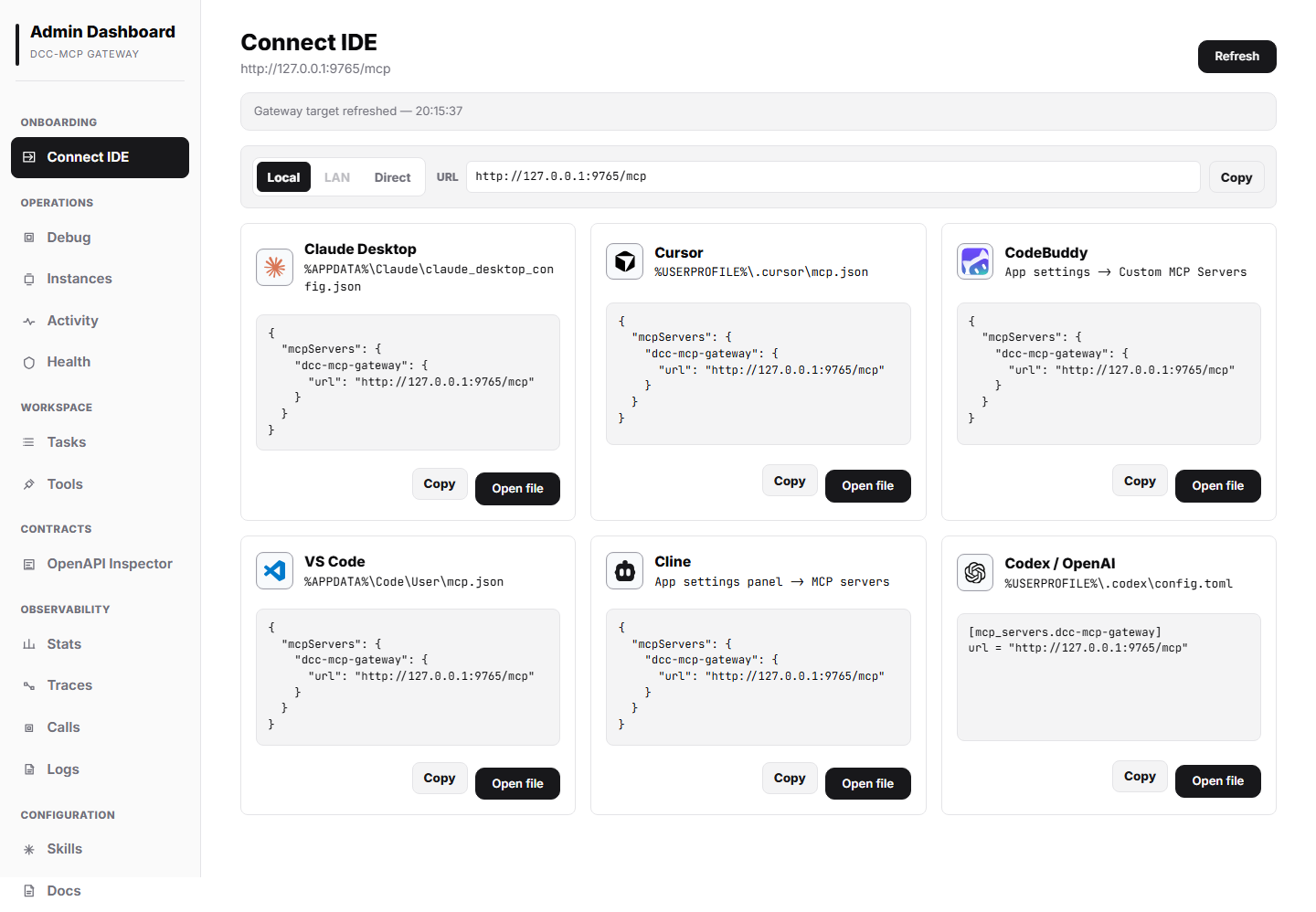
命令中心 面板会基于当前 gateway URL 生成可复制的 agent 提示词、human CLI 命令, 以及 Claude Desktop、Cursor、CodeBuddy、VS Code、Cline 和 Codex / OpenAI 的 MCP 配置片段。命令会强调 dcc-mcp-cli 在访问 live DCC 前会自动确保本机 gateway 存在。
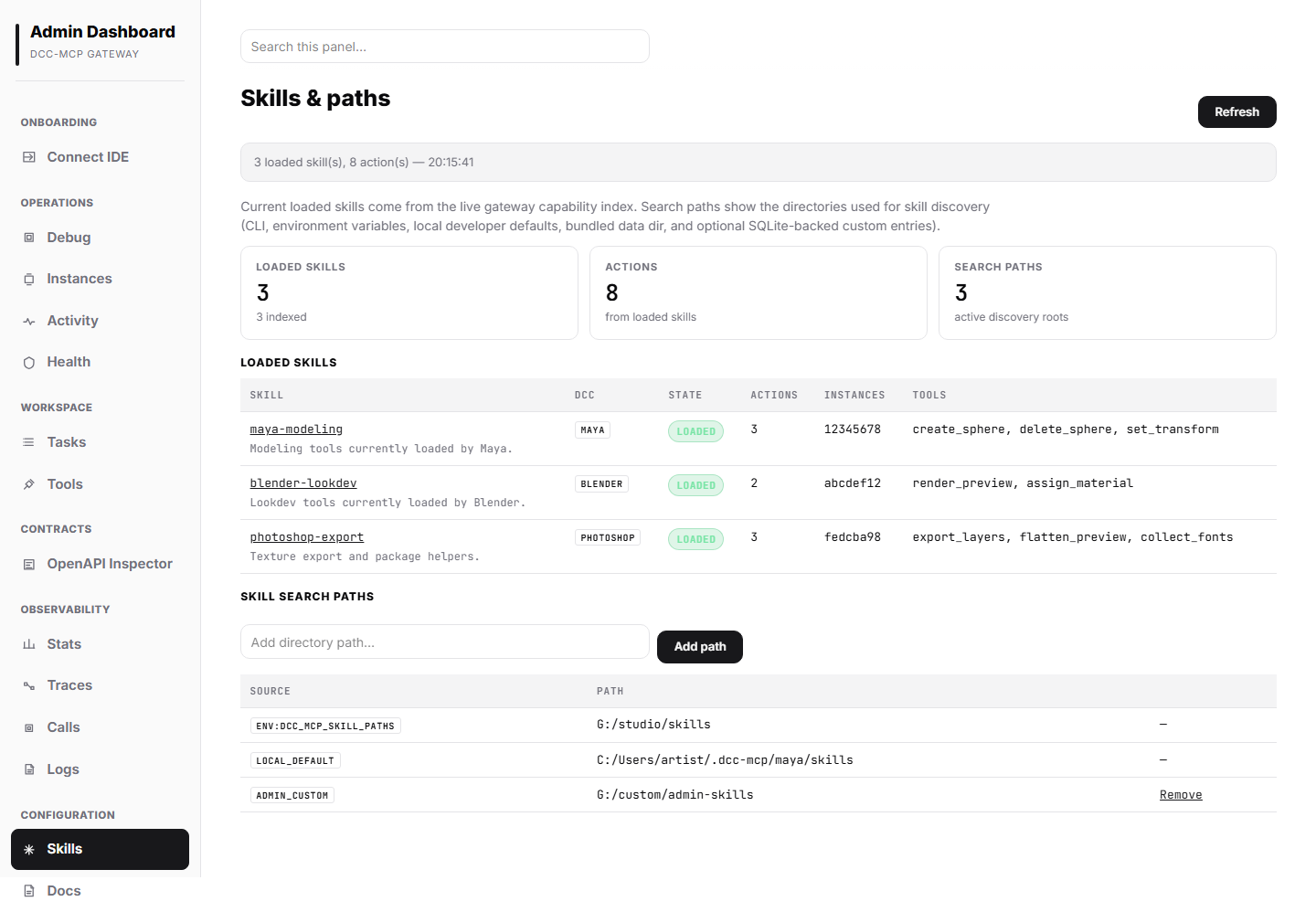
Skills 面板展示当前已加载的 skills、action 数量、后端实例前缀、活动发现路径,以及本地开发默认路径 ~/.dcc-mcp/{dcc-type}/skills(存在时)。
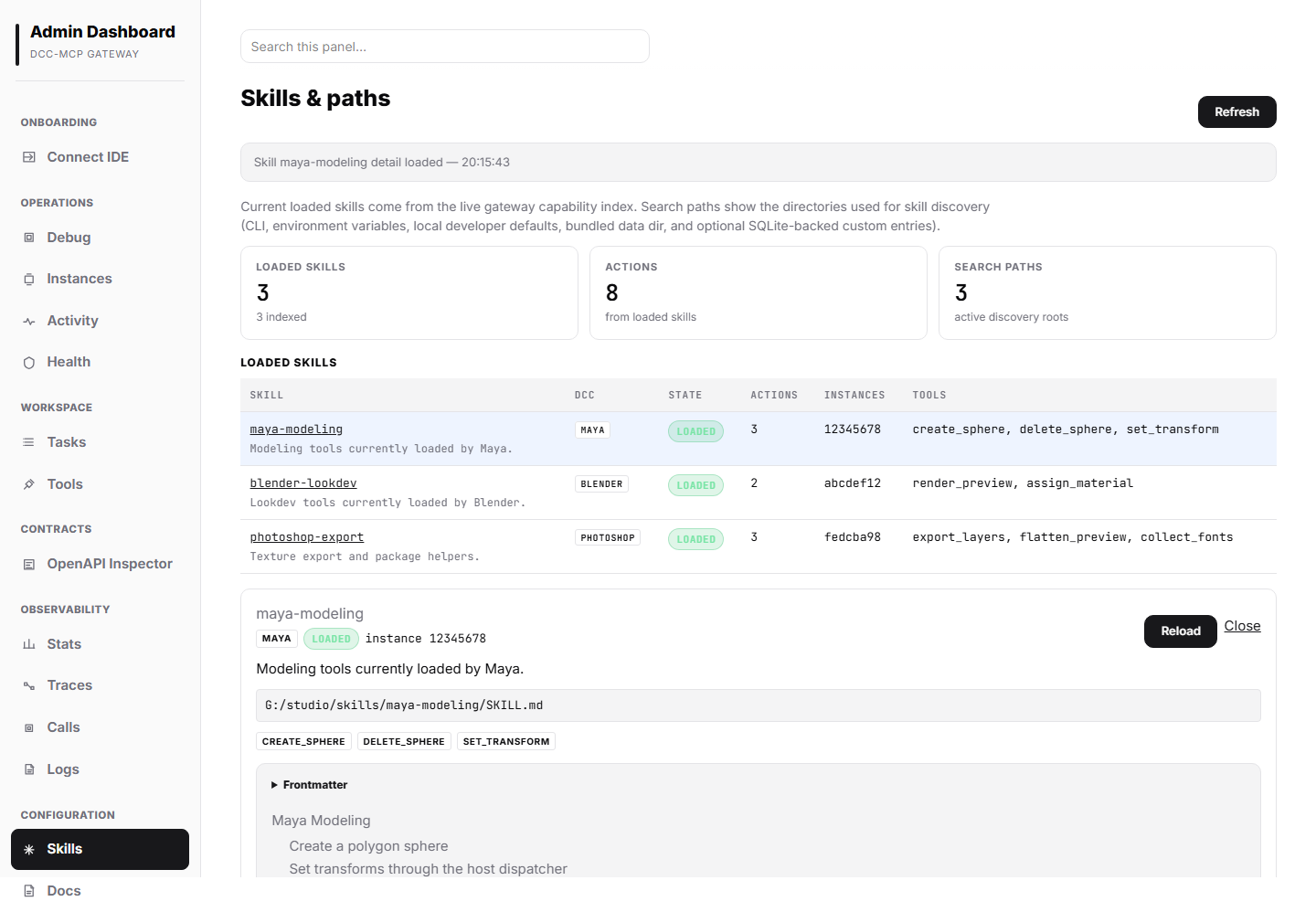
点击某个 skill 会打开详情面板,显示后端实例信息、注册工具、SKILL.md 源路径、frontmatter,以及渲染后的 Markdown 正文,方便开发者 review。
市场面板(Marketplace)
Marketplace 面板位于左侧导航栏,为浏览、安装和管理技能包提供图形界面。 它与 CLI marketplace 子命令共享同一套后端能力,通过三个标签页展现: 浏览(Browse)、已安装(Installed) 和 来源(Sources)。
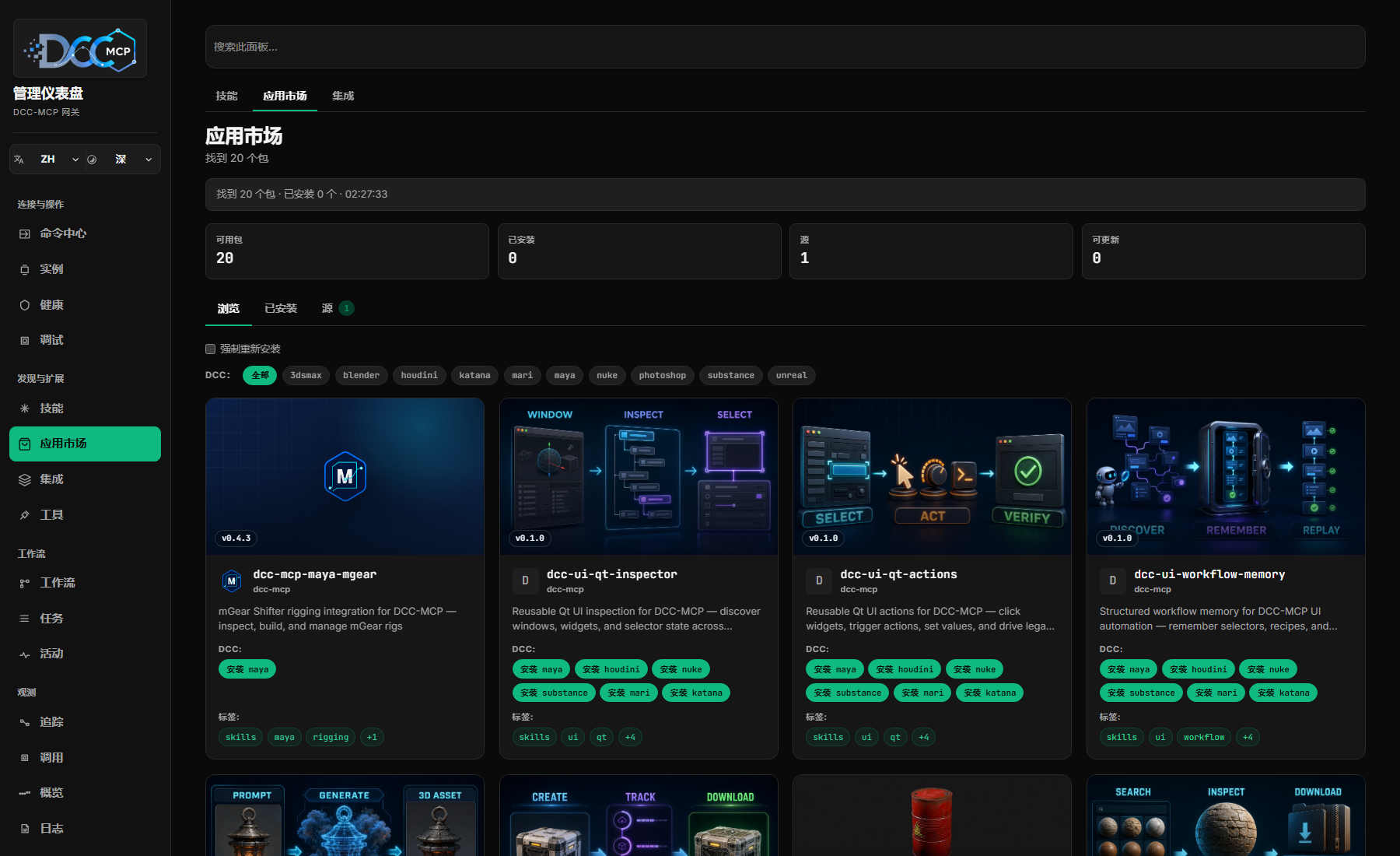
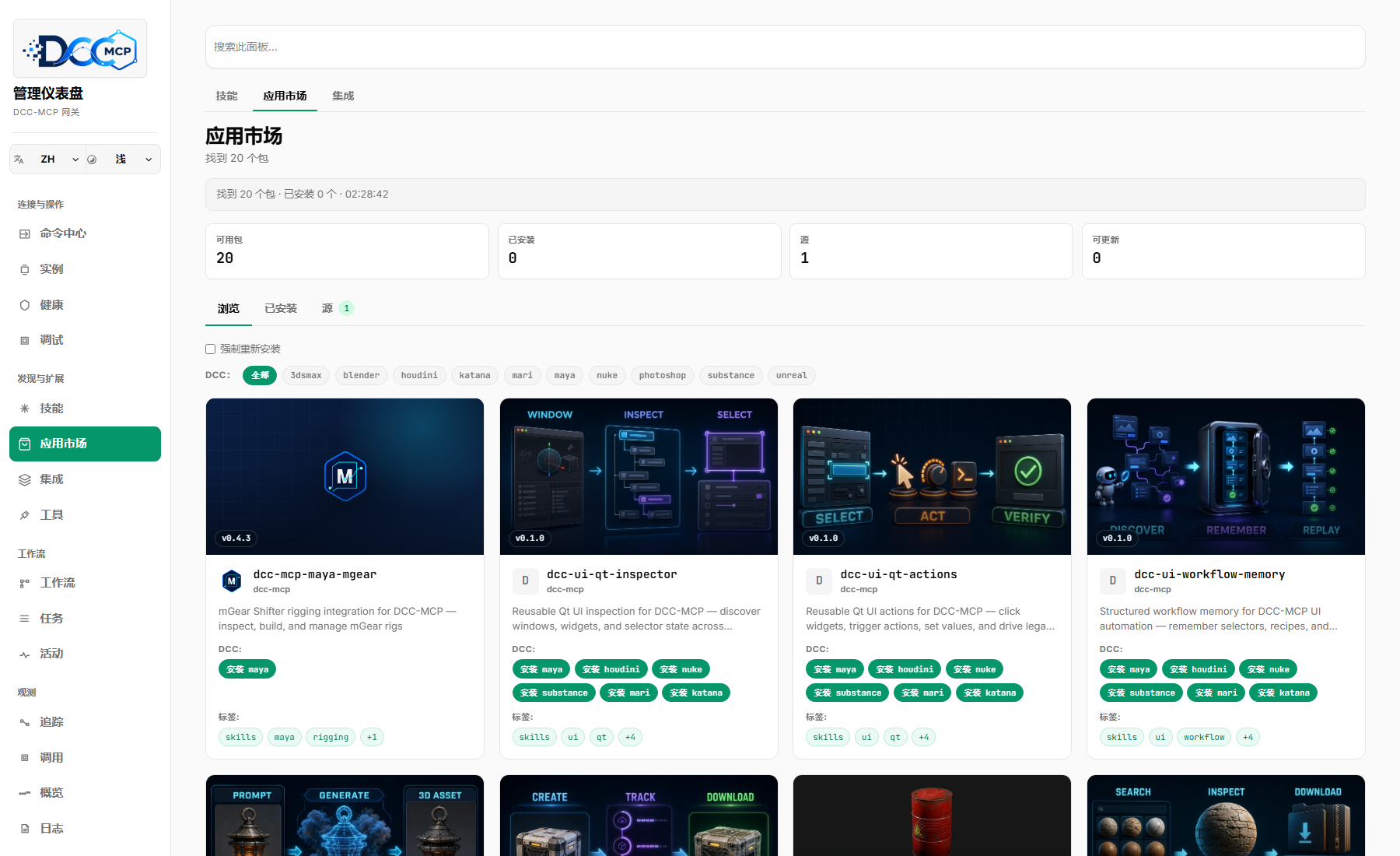
浏览标签页
浏览标签页以可搜索的视觉目录展示可用技能包。卡片会优先显示随固定 source.ref 发布的 16:9 工作流展示图,并在下方紧凑呈现包名、描述、 DCC 操作、版本和标签;未发布展示图时自动回退到包或 DCC 图标。
用户可通过以下方式筛选目录:
- 搜索查询:按名称、描述和标签进行文本搜索。
- DCC 类型筛选:标签页顶部的 Chip 按钮行,可按 DCC 类型筛选。搜索和 DCC 筛选可以组合使用。
点击卡片会打开 Marketplace 详情弹窗,展示完整元数据:名称、描述、 版本、标签、DCC 类型、维护者、项目 URL、来源、安装类型(git、zip、path) 和 min_core_version。当包的 min_core_version 低于当前运行的核心版本时, 会显示兼容性警告。
从详情弹窗或卡片安装包会触发市场安装流程。安装成功后,页面内联显示一条 成功通知,其中包含 View in Skills 深度链接,点击可跳转到 Skills 面板 并高亮新加载的 skill。如果后端报告了 reload_required 标志,技能索引会 自动刷新。
已安装标签页
已安装标签页是更适合运维扫描的紧凑清单,不再重复使用卡片网格。它按每个 已安装的 {package, dcc} 组合显示一行,包含:
- 包名、DCC 类型和本地安装路径
- 已安装版本;当 catalog 中存在更高版本时显示可更新角标
- 来源名称 / URL 以及安装类型(
git、zip或path) - 可用时显示安装时间
- 直接的 详情、更新 和 卸载 操作
用户可直接从此标签页卸载包。卸载成功后,技能索引会刷新以移除已删除的包。 点击 详情 会打开侧滑详情面板,显示包路径、来源元数据、可用的 catalog 元数据,以及同一组更新/卸载操作。
来源管理标签页
Sources 标签页允许操作员不通过 CLI 也能查看和新增 marketplace 来源:
- 来源列表:显示每个配置来源的 origin(
builtin、config、env)和原始 URL。 - 新增来源:内联输入新的 marketplace source。重复添加是幂等的,不会变成硬错误。
- 只读来源:内置、环境变量和已有配置来源会作为溯源证据展示。当前 Admin API 对 sources 暴露
GET和POST;删除来源还不是这个 UI 合约的一部分。
来源变更会影响后续 catalog 查询;浏览标签页会在下一次交互或刷新时使用新的来源。
更新流程
当已安装包存在新版本时,已安装清单会在对应行显示 更新 按钮。该按钮只更新 当前 {package, dcc} 组合。后端 API 也接受 { all: true },方便自动化一次性更新 所有过期包;浏览器 UI 刻意保持为逐行操作,避免误触大批量更新。
更新流程内部使用覆盖安装语义,因此新 catalog 版本可以替换当前 checkout 或解压目录。 对于 git 类型安装,更新会在原位置 fetch 新 ref;其他类型会从 catalog 重新安装。
强制重新安装
浏览标签页提供 强制重新安装 复选框。启用后,安装请求会发送 force: true, 允许覆盖已有本地安装。更新请求也使用同样的覆盖语义,以便新版包替换当前安装。
结构化错误显示
安装、更新和卸载会返回结构化错误,UI 会映射成操作员可读消息,而不是直接展示原始 JSON。目前识别的 marketplace 错误类型包括 already_installed、not_found、 hash_mismatch、missing_skill 和 command_failed;网络错误会单独提示。如果 Admin API 路由意外返回 HTML shell(例如 dev server 或反向代理把 /admin/api/marketplace/install 路由回 Vite 页面),UI 会显示 Admin API returned HTML for ...,让操作员知道是 gateway/admin 路由错误,而不是 看到 Unexpected token '<'。
API 端点
| 路由 | Content-Type | 说明 |
|---|---|---|
GET /admin/api/marketplace/catalog | application/json | 列出所有已配置来源中的可用包。返回 { entries: MarketplaceEntry[] }。 |
GET /admin/api/marketplace/installed | application/json | 列出本地已安装的包(按 DCC 分组)。返回 { packages: InstalledMarketplacePackage[] }。 |
POST /admin/api/marketplace/install | application/json | 安装包。请求体:{ name, dcc, source?, force? }。返回带 reload_required 标志的结果。 |
POST /admin/api/marketplace/uninstall | application/json | 卸载包。请求体:{ name, dcc }。返回带 reload_required 标志的结果。 |
GET /admin/api/marketplace/sources | application/json | 列出已配置的市场来源及其来源类型(builtin、config、env)。 |
POST /admin/api/marketplace/sources | application/json | 添加市场来源到持久化配置。请求体:{ source }。重复添加是幂等的。 |
GET /admin/api/marketplace/outdated | application/json | 列出有更新版本的已安装包。支持 ?name=&dcc= 筛选参数。 |
POST /admin/api/marketplace/update | application/json | 更新一个或全部过期包。请求体:{ name?, dcc?, all? }。返回每个结果的 reload_required 标志。 |
路由
| 路由 | Content-Type | 说明 |
|---|---|---|
GET /admin | text/html | 以单个 HTML 资产提供的嵌入式 React/Vite 仪表盘 |
GET /admin/api/activity?limit=300 | application/json | 由审计、trace 和 gateway 事件合并得到的统一活动时间线 |
GET /admin/api/instances | application/json | 已连接的 DCC 实例 |
POST /admin/api/instances/{instance_id}/update | application/json | 为单个实例检查并暂存 dcc-mcp-server 更新;实例卡片会显示结果和是否需要重启 |
GET /admin/api/tools | application/json | 已注册的 MCP 工具 |
GET /admin/api/workflows?limit=200 | application/json | 由 search telemetry、traces 和 audits 重建的 agent session/workflow 视图 |
GET /admin/api/tasks?limit=300 | application/json | 从 dispatch traces 重建出的任务视图 |
GET /admin/api/calls | application/json | 最近的工具调用;可用时包含 compact/JSON token accounting(需要 AuditMiddleware) |
GET /admin/api/traces | application/json | 最近的逐调用 dispatch traces,包含 payload size 与 token accounting;支持 ?limit=200 |
GET /admin/api/traces/{request_id} | application/json | 某次调用的完整 waterfall trace,包含 token accounting 且不写入无界 payload |
GET /admin/api/traffic?limit=300 | application/json | 显式 admin_live traffic sink 保留的 live traffic.frame envelopes |
GET /admin/api/traffic/export?limit=1000 | application/x-ndjson | 将保留的 live traffic frames 导出为 JSONL,便于本地 replay/diff |
GET /admin/api/debug-bundle/{request_id} | application/json | 单次请求的一站式 debug bundle,包含 trace、匹配审计行、相关活动和提示 |
GET /admin/api/stats?range=1h|24h|7d | application/json | 聚合调用数、成功率、延迟、top tools/instances、payload token coverage 和 response token savings totals |
GET /admin/api/analytics/overview?range=7d|30d|90d|180d|365d | application/json | Analytics KPI 汇总、top tools、Token 总量和统计周期边界 |
GET /admin/api/analytics/timeseries?range=...\&granularity=day | application/json | 每日调用、Token、平均耗时和 max_duration_ms 序列,用于趋势图和 Token 活动日历 |
GET /admin/api/analytics/heatmap?range=... | application/json | 兼容旧客户端的小时 / 星期聚合热力图端点 |
GET /admin/api/analytics/export?range=... | text/csv 或 application/x-ndjson | 下载 analytics 数据,便于本地 review |
GET /admin/api/governance?limit=300 | application/json | 当前 gateway policy、traffic capture、redaction、中间件控制和最近 allow/deny/throttle 决策 |
GET /admin/api/workers | application/json | 来自 live registry 的实例卡片;响应字段名保留 workers 以兼容现有客户端 |
GET /admin/api/logs | application/json | 合并后的网关竞争事件、磁盘 *.log 行和审计调用摘要 |
GET /admin/api/health | application/json | 服务健康摘要 |
GET /admin/api/skills | application/json | 按 DCC 类型、skill 名、加载状态、工具、后端实例,以及来自 search telemetry 和审计调用的 skill 健康/采用指标聚合实时 skill 清单 |
GET /admin/api/skill-detail?name=... | application/json | 单个 skill 的后端详情;可用时包含用于 review 的 SKILL.md Markdown 内容 |
GET /admin/api/skill-paths | application/json | 当前 skill 发现根目录,返回安全路径别名、存在/缺失状态和 source/id 元数据,便于公开截图和导出 |
POST /admin/api/skill-paths | application/json | 添加 SQLite 持久化的自定义 skill 发现根目录,并刷新 live backend skill index |
DELETE /admin/api/skill-paths/{id} | application/json | 删除 SQLite 持久化的自定义 skill 发现根目录,并刷新 live backend skill index |
GET /admin/api/integrations | application/json | 集成配置摘要:Sentry DSN 状态、webhook 数量、企微消息推送、OTLP endpoint 和 pending-restart 标志 |
PUT /admin/api/integrations | application/json | 将单个文件型集成保存到 ~/dcc-mcp/etc 或 DCC_MCP_ETC_DIR,并返回掩码后的 pending-restart 条目 |
面向 agent 的稳定镜像位于 /v1/debug/*,并会出现在 GET /v1/openapi.json。 Admin 路由仍作为 dashboard 兼容层;自动化调用优先使用:
| 稳定路由 | 镜像 |
|---|---|
GET /v1/debug/stats | /admin/api/stats |
GET /v1/debug/governance?limit=300 | /admin/api/governance |
GET /v1/debug/traffic?limit=300 | /admin/api/traffic |
GET /v1/debug/traffic/export?limit=1000 | /admin/api/traffic/export |
GET /v1/debug/agent-traces/{lookup_id} | 按 trace id 或 request id 获取 public-safe agent trace packet |
GET /v1/debug/search-telemetry | /admin/api/search-telemetry |
GET /v1/debug/analytics/overview | /admin/api/analytics/overview |
GET /v1/debug/analytics/timeseries | /admin/api/analytics/timeseries |
GET /v1/debug/analytics/heatmap | /admin/api/analytics/heatmap |
GET /v1/debug/analytics/export | /admin/api/analytics/export |
GET /v1/debug/integrations | /admin/api/integrations |
GET /v1/debug/health | /admin/api/health |
Analytics 面板默认渲染 365d Token 活动日历。它用 overview.kpi.tokens_total 作为累计 Token,用 timeseries[*].tokens_input + tokens_output 计算每日颜色强度,并使用 timeseries[*].max_duration_ms 显示“最长任务时长”。旧的 weekday/hour 热力图端点继续保留用于兼容,但仪表盘的贡献日历视图不再依赖它。
/admin?panel=traces&trace=<request_id> 这类浏览器 deep link 只用于 UI 导航。历史上的 /admin?agent=traces&trace=<id> 也按 UI 链接处理;agent 和自动化客户端应使用 GET /v1/debug/agent-traces/{lookup_id} 读取稳定的 机器可读包。
compact-aware debug routes 默认仍返回 JSON,方便浏览器下载和 GitHub issue 附件。agent 可以在 /v1/debug/traces、/v1/debug/traces/{request_id}、 /v1/debug/trace-context/{lookup_id}、/v1/debug/bundles/{request_id_or_trace_id} 和 /v1/debug/stats 上使用 Accept: application/toon、?response_format=toon 或 ?compact=true 请求 TOON。响应会包含 x-dcc-mcp-response-format、byte counts、estimated token counts 和 savings headers。debug bundle compact 输出是 summary,包含 root cause、tool、DCC type、status、timing、token accounting、 redaction summary 和指向完整 JSON bundle 的 links。
API 响应格式
// GET /admin/api/health
{
  "status": "ok",
  "uptime_secs": 3600,
  "instances_total": 3,
  "instances_ready": 2
}

// GET /admin/api/instances
{
  "total": 3,
  "instances": [
    { "id": "a1b2c3d4-...", "dcc_type": "maya", "status": "ready", "address": "127.0.0.1:9001" }
  ]
}

// GET /admin/api/activity?limit=300
{
  "total": 2,
  "events": [
    {
      "event_id": "audit:req-123",
      "timestamp": "2026-05-05T10:00:00Z",
      "kind": "tool_call",
      "severity": "info",
      "status": "ok",
      "message": "tools/call maya__open_scene",
      "tool": "maya__open_scene",
      "duration_ms": 48,
      "correlation": {
        "request_id": "req-123",
        "session_id": "session-1",
        "instance_id": "abcdef01-2345-6789-abcd-ef0123456789",
        "dcc_type": "maya"
      }
    }
  ]
}

// GET /admin/api/tasks?limit=300
{
  "total": 1,
  "tasks": [
    {
      "task_id": "req-123",
      "task_type": "tool_call",
      "status": "completed",
      "title": "maya__open_scene",
      "started_at": "2026-05-05T10:00:00Z",
      "duration_ms": 48,
      "correlation": {
        "request_id": "req-123",
        "instance_id": "abcdef01-2345-6789-abcd-ef0123456789",
        "dcc_type": "maya"
      }
    }
  ]
}

// GET /admin/api/workflows?limit=200
{
  "total": 1,
  "workflows": [
    {
      "workflow_id": "session-1",
      "group_kind": "session",
      "title": "Layout Inspector: maya.abcdef01.scene__inspect",
      "status": "completed",
      "discovery": {
        "search_count": 1,
        "zero_result_count": 0,
        "selected_count": 3,
        "best_selected_rank": 2,
        "time_to_first_success_ms": 310,
        "search_ids": ["search-123"]
      },
      "steps": [
        { "kind": "search", "title": "search scene inspect", "status": "ok" },
        { "kind": "describe", "title": "maya.abcdef01.scene__inspect", "status": "ok" },
        { "kind": "load_skill", "title": "load_skill scene", "status": "ok" },
        { "kind": "call", "request_id": "req-123", "title": "maya.abcdef01.scene__inspect", "status": "ok" }
      ]
    }
  ]
}

// GET /admin/api/calls  (需要 AuditMiddleware)
{
  "total": 42,
  "calls": [
    {
      "request_id": "req-123",
      "method": "tools/call",
      "tool": "maya.abcdef01.maya__open_scene",
      "dcc_type": "maya",
      "instance_id": "abcdef01-2345-6789-abcd-ef0123456789",
      "session_id": "session-1",
      "token_accounting": {
        "response_format": "toon",
        "token_estimator": "dcc-mcp-byte4-v1",
        "original_tokens": 120,
        "returned_tokens": 54,
        "saved_tokens": 66,
        "savings_pct": 55.0
      },
      "success": false,
      "error": "backend timeout",
      "timestamp": "2026-05-05T10:00:00Z"
    }
  ]
}

// GET /admin/api/traces?limit=200
{
  "total": 1,
  "traces": [
    {
      "request_id": "req-123",
      "method": "tools/call",
      "tool_slug": "maya.abcdef01.maya__open_scene",
      "dcc_type": "maya",
      "total_ms": 48,
      "ok": true,
      "spans": [
        { "name": "gateway.route", "duration_ns": 1200000, "ok": true, "attributes": {} }
      ],
      "input": { "mime_type": "application/json", "truncated": false, "original_size": 42, "content": "{...}" },
      "output": { "mime_type": "application/json", "truncated": false, "original_size": 96, "content": "{...}" },
      "token_accounting": {
        "response_format": "json",
        "token_estimator": "dcc-mcp-byte4-v1",
        "original_tokens": 24,
        "returned_tokens": 24,
        "saved_tokens": 0,
        "savings_pct": 0.0
      }
    }
  ]
}

// GET /admin/api/traces/req-123 返回同一个完整 trace 对象;未命中时返回 404。

Admin token 字段刻意拆成两套账:`payload_token_usage`、trace
`input_tokens`/`output_tokens` 和 `payload_token_accounting` 是来自已捕获
request/response payload preview 的估算;缺失时用 `missing_payload_tokens`
显式表达。`token_usage`、`response_token_accounting` 以及每次调用的
`original_tokens`/`returned_tokens`/`saved_tokens` 描述 JSON/TOON 响应压缩
前后的 token accounting,不能替代缺失的 payload 估算。

// GET /admin/api/debug-bundle/req-123
{
  "request_id": "req-123",
  "trace": { "request_id": "req-123", "spans": [] },
  "audit": { "request_id": "req-123", "success": true },
  "related_activity": [],
  "hints": []
}

// GET /admin/api/stats?range=24h
{
  "range": "24h",
  "total_calls": 42,
  "success_rate": 0.98,
  "latency": { "p50_ms": 12, "p95_ms": 48 },
  "payload_token_usage": {
    "token_estimator": "dcc-mcp-byte4-v1",
    "total_input_tokens": 1200,
    "total_output_tokens": 900,
    "total_tokens": 2100,
    "calls_with_any_payload_tokens": 21,
    "calls_missing_payload_tokens": 21,
    "avg_total_tokens_per_call": 50.0,
    "avg_total_tokens_per_recorded_call": 100.0
  },
  "token_usage": {
    "total_returned_tokens": 5400,
    "total_saved_tokens": 2100,
    "average_savings_pct": 28.0,
    "by_response_format": [
      { "name": "toon", "calls": 24, "returned_tokens": 3200, "saved_tokens": 2100, "savings_pct": 39.62 },
      { "name": "json", "calls": 18, "returned_tokens": 2200, "saved_tokens": 0, "savings_pct": 0.0 }
    ]
  }
}

// GET /admin/api/governance?limit=300
{
  "schema_version": "dcc-mcp.admin.governance.v1",
  "mode": {
    "admin_mutations": "disabled",
    "reason": "Governance mutations are disabled because Admin has no authentication by default."
  },
  "policy": {
    "read_only": true,
    "unrestricted": false,
    "allowlists_active": { "dcc_types": true, "tool_slug_prefixes": true },
    "allowed_dcc_types": ["maya", "photoshop"],
    "allowed_tool_slug_prefixes": ["maya.a1b2"]
  },
  "traffic_capture": {
    "enabled": true,
    "mode": "aggregate",
    "production_guardrail": "capture only safe aggregate data unless explicitly configured",
    "redaction": { "paths": ["body.data.params.arguments.api_key"], "redacted_total": 8 }
  },
  "middleware": {
    "controls": [
      { "kind": "quota", "mode": "rate-limit", "summary": "100 calls / 60s" }
    ]
  },
  "stats": { "recent_allowed": 1200, "recent_policy_denied": 4, "recent_throttled": 3, "redacted_path_count": 8 },
  "recent_decisions": [
    {
      "request_id": "req-123",
      "outcome": "throttled",
      "tool": "maya.a1b2.scene__inspect",
      "traffic_capture": { "captured": 0, "skipped": 1, "reasons": ["filtered-by-rule"] },
      "privacy": { "redacted_paths": [] },
      "pressure": { "quota_active": true, "throttled": true }
    }
  ]
}

// GET /admin/api/workers
{
  "summary": { "live": 2, "stale": 0, "unhealthy": 0 },
  "workers": [
    { "instance_id": "a1b2c3d4-...", "dcc_type": "maya", "status": "available" }
  ]
}

// GET /admin/api/logs
{
  "total": 5,
  "logs": [
    {
      "timestamp": "2026-05-05T09:59:00Z",
      "level": "info",
      "message": "tools/call ok 12ms — maya__open_scene",
      "source": "audit",
      "dcc_type": "maya",
      "instance_id": "abcdef01-2345-6789-abcd-ef0123456789",
      "request_id": "req-123",
      "tool": "maya__open_scene",
      "success": true,
      "detail": "instance=abcdef01-2345-6789-abcd-ef0123456789"
    }
  ]
}接入 AuditMiddleware
要让 /admin/api/calls 数据源有内容,需要在中间件链中添加 AuditMiddleware:
use dcc_mcp_gateway::gateway::middleware::{AuditMiddleware, MiddlewareChain};

GatewayConfig {
    admin_enabled: true,
    middleware_chain: MiddlewareChain::new()
        .with_before(Arc::new(AuditMiddleware::default())),
    ..GatewayConfig::default()
}/admin/api/logs 数据源由三类有界来源自动合并:EventLog 环形缓冲区(网关选举/驱逐/探针事件,来自 issue #766)、DCC_MCP_LOG_DIR 或平台默认日志目录下的 *.log 文件,以及最近的 AuditMiddleware 调用行。/admin/api/traces、/admin/api/stats 和 /admin/api/workers 分别来自 dispatch TraceLog、StatsAggregator 与 live gateway registry。
设置 DCC_MCP_GATEWAY_AUDIT_DIR 后会启用 JSONL 持久化。网关会将有界的 admin 调用行追加到 audit.jsonl,将 dispatch traces 追加到 traces.jsonl,并同时按 DCC_MCP_GATEWAY_AUDIT_MAX_ROWS 和 DCC_MCP_GATEWAY_AUDIT_MAX_BYTES 裁剪每个文件,然后在重启时用这些文件回填内存中的 admin 缓冲区。持久化内容仍使用内存 trace 捕获同一套有界/已脱敏 TracePayload,不会写入无界原始请求体。
仪表盘功能
HTML 仪表盘包含:
- Debug Workbench:默认首屏会组合 health、instances、calls、traces、stats 和 warning logs,方便排查 gateway 故障时不用在多个面板之间来回跳转
- Gateway owner identity:Health 和 Debug 面板会展示来自
gateway_name/DCC_MCP_GATEWAY_NAME的当前__gateway__sentinel 标签,以及 challenger 候选 - 左侧导航:按职责分为连接与操作(命令中心、实例、健康、调试)、发现与扩展(技能、应用市场、集成、工具)、工作流、观测(追踪、调用、概览、日志)、洞察(分析)以及治理与契约(治理、OpenAPI 检查器)。
- 自动刷新:每个面板每 5 秒轮询对应 JSON 端点
- DCC 图标:Maya/Autodesk、Blender、GIMP、Inkscape、Krita、Unity、Unreal 等常见宿主显示可识别图标,自定义宿主使用安全 fallback
- 实例卡片:按实例展示状态、心跳与路由元数据
- Calls 表格:展示 request id、错误摘要与 trace detail 链接;DCC 优先从解析后的 backend slug 展示,其次使用调用参数中的
dcc/dcc_type - Trace 下钻:
/admin/api/traces/{request_id}暴露单次调用的完整 waterfall,以及有界/已脱敏的输入输出 payload - Traffic 面板:当 traffic config 包含
kind: admin_live时,/admin/api/traffic暴露内存环形缓冲区中的 frame,/admin/api/traffic/export可下载 JSONL - Governance 面板:展示 read-only 状态、allowlists、traffic capture 模式/sink、生产 guardrail、redaction path 汇总、中间件限流控制,以及最近 allowed/denied/throttled/capture 决策
- Logs 面板:将标准化的
contention、file、audit行分组,方便在一条时间线里关联路由事件、滚动日志和工具调用。文件日志读取会限制为最近文件与尾部片段,避免 admin API 扫描无界历史日志 - 集成面板:第三方集成的可编辑配置摘要——Sentry DSN 状态、活跃 webhook 数量和名称、企微消息推送、OTLP 端点,以及需要重启才能生效的配置变更 pending_restart 标记
- 可选持久化:
DCC_MCP_GATEWAY_AUDIT_DIR可让 Calls 与 Traces 面板跨重启保留,且不改变 JSON API 结构 - 深色主题:Vite/React 源码,运行时嵌入资产,不要求现场构建
- 响应式布局:窄屏会切换为顶部导航,debug 卡片和图表保持可用的单列宽度
Operator 工作流
把仪表盘当作运维操作面,而不是静态报表:
- 从命令中心开始:给 Agent 交接时使用提示词标签页;给人类 operator 使用 human CLI 标签页。常规 gateway-backed 命令会由
dcc-mcp-cli自动确保本机 loopback gateway,除非正在排查生命周期问题,否则不需要额外 增加手动预启动步骤。 - 实例升级走 Instances 面板:每个实例行会显示当前 server/adapter 版本。 点击更新按钮会请求
POST /admin/api/instances/{instance_id}/update, 暂存dcc-mcp-server更新,并明确提示是否需要重启该 DCC backend。 - 能力变更走 Skills 与 Marketplace:Skills 面板展示实时 gateway 清单和 自定义路径状态;Marketplace 通过
/admin/api/marketplace/*安装、更新和卸载 skill 包。包变更后,带reload_required的响应会刷新 skill 清单,并提示 live adapter 是否还需要load-skill。 - 可观测性配置走 Integrations:Sentry、event webhooks、企微消息推送和 OTLP 默认写入
~/dcc-mcp/etc或DCC_MCP_ETC_DIR,所有 API 响应都会对密钥 做掩码。运行时环境变量在重启前仍然优先于已保存文件。 - 活动洞察走 Analytics:类似 contribution calendar 的 Token 活动日历来自 analytics API,用于查看真实 Agent 使用模式,而不是只展示演示热力图。
集成面板
集成面板(GET /admin/api/integrations)展示网关第三方集成配置。操作员可以通过 PUT /admin/api/integrations 暂存编辑;暂存值会显示为 pending_restart, 直到网关或服务端进程用等效环境变量或配置文件重启后才真正生效。
| 集成 | 配置方式 | 面板展示内容 |
|---|---|---|
| Sentry | 环境变量优先,其次 ~/dcc-mcp/etc/sentry.json | DSN 状态(已掩码)、环境、版本、采样率 |
| Webhooks | DCC_MCP_WEBHOOKS_CONFIG 优先,其次 ~/dcc-mcp/etc/webhooks.yaml | 活跃 webhook 数量、YAML 内容、配置路径 |
| 企微消息推送 | 环境变量优先,其次 ~/dcc-mcp/etc/webhooks.yaml 中的 wecom-message-push 条目 | 已掩码群机器人 URL、事件模式、消息模板 |
| OTLP 追踪 | 环境变量优先,其次 ~/dcc-mcp/etc/otlp.json | 端点 URL、服务名称、请求头 |
集成会在服务启动时加载。面板编辑是安全的操作员预览和重启提示。默认情况下, 可编辑的文件型集成会写入 ~/dcc-mcp/etc;可通过 DCC_MCP_ETC_DIR 移动该目录。环境变量在运行时仍优先于本地文件,因此 config_path 可能表示当前 由环境变量加载的文件,而 write_config_path 表示 Admin UI 保存编辑的位置。 面板会一致写入用户配置目录,包括已设置 DCC_MCP_WEBHOOKS_CONFIG 时的 Webhooks 编辑。企微快捷配置会写入共享的 webhooks.yaml 文件,但不会删除其他 webhook 条目;它只替换已有的 kind: wecom 或 name: wecom-message-push 条目。详见 gateway.md 的完整配置参考。
后端 API
// GET /admin/api/integrations
{
  "integrations": [
    {
      "kind": "sentry",
      "label": "Sentry Error Monitoring",
      "status": "active",
      "config": {
        "dsn": "https://********@o0.ingest.sentry.io/0",
        "environment": "production",
        "config_path": "C:/Users/example/dcc-mcp/etc/sentry.json",
        "write_config_path": "C:/Users/example/dcc-mcp/etc/sentry.json"
      },
      "env_locked_fields": [
        {"key": "dsn", "locked": true, "env_var": "DCC_MCP_SENTRY_DSN"}
      ]
    },
    {
      "kind": "wecom",
      "label": "WeCom Message Push",
      "status": "pending_restart",
      "config": {
        "webhook_url": "https://qyapi.weixin.qq.com/cgi-bin/webhook/send?key=********",
        "event_types": ["tool.failed", "gateway.instance.*"],
        "template": "DCC-MCP $event\nDCC: $dcc-type\nURL: $url",
        "config_path": "C:/Users/example/dcc-mcp/etc/webhooks.yaml",
        "write_config_path": "C:/Users/example/dcc-mcp/etc/webhooks.yaml"
      },
      "env_locked_fields": [
        {"key": "webhook_url", "locked": false, "env_var": "DCC_MCP_WECOM_WEBHOOK_URL"}
      ]
    }
  ]
}响应中会省略密钥:Sentry DSN 和企微机器人 key 在有效配置和暂存配置中都会被掩码。原始 DSN 与企微机器人 URL 只会写入本地配置文件。当集成未配置时,其条目使用 status: "inactive" 和空配置字段。
暂存编辑时发送集成类型和配置字段:
// PUT /admin/api/integrations
{
  "kind": "wecom",
  "config": {
    "webhook_url": "https://qyapi.weixin.qq.com/cgi-bin/webhook/send?key=...",
    "event_types": ["tool.failed", "gateway.instance.*"],
    "template": "DCC-MCP $event\nDCC: $dcc-type\nURL: $url"
  }
}响应会返回更新后的集成条目,并带有 status: "pending_restart"。
稳定版面向 agent 的路由
| 稳定路由 | 镜像来源 |
|---|---|
GET /v1/debug/integrations | /admin/api/integrations |
PUT /admin/api/integrations | 暂存单个集成的待重启配置 |
安全注意事项
Admin UI 默认无认证。它绑定在赢得选举的 gateway 所使用的 host 上,而默认 host 是 127.0.0.1。部分面板只读,但仪表盘也包含本地操作员 mutation,例如自定义 skill path、marketplace 安装/更新/卸载、保存 ~/dcc-mcp/etc 下的集成配置,以及 实例更新暂存。生产环境建议:
- 保持 localhost 绑定,或通过反向代理添加 IP 白名单 / Basic Auth。
- 不需要时禁用:
--no-admin、DCC_MCP_NO_ADMIN=true或cfg.admin_enabled = False。 - 将 Governance 面板视为只读检查面;policy、capture、redaction、quota 的修改仍应通过经过认证的部署配置完成。
- 切勿直接暴露到公网。
参见
- middleware.md — 填充
/admin/api/calls的AuditMiddleware - observability.md — 填充
/admin/api/logs的EventLog - gateway.md — 完整的网关配置参考(webhooks、Sentry、OTLP)
- sentry.md — Sentry 错误监控参考